

A database gives you guarantees that plain files cannot: a transaction applies fully or not at all, two concurrent writes do not silently overwrite each other, and a committed change survives the power going out. Those guarantees are the reason the thing exists.
What that explanation leaves open is how any of it is possible, because underneath there is no magic storage layer. The database is writing to the same filesystem your JSON file was on, with the same disk and the same ways of failing. Something has to be different about how it writes, and that something is the whole subject of this article.
This is the layer most developers never look at, which is a shame, because it explains a surprising number of things that otherwise look arbitrary. Why committing a large transaction is fast. Why adding an index slows down your inserts. Why "the database is slow" is so often a memory problem rather than a disk one.
It really is still files#
Start with the deflating part. If you open a PostgreSQL data directory you find files and folders. Every table is a file, or several once it grows past a size limit. A SQLite database is one single file that you can copy with cp and email to someone, which is a large part of why it ended up inside phones, browsers and aeroplanes.
So the difference between a database and the users.json you would have written yourself is not where the bytes live. It is the discipline with which they are put there, and that discipline comes down to three ideas: the file is divided into blocks, changes are written down before they are applied, and a second sorted structure exists so nothing has to be scanned.
Pages, not one big blob#
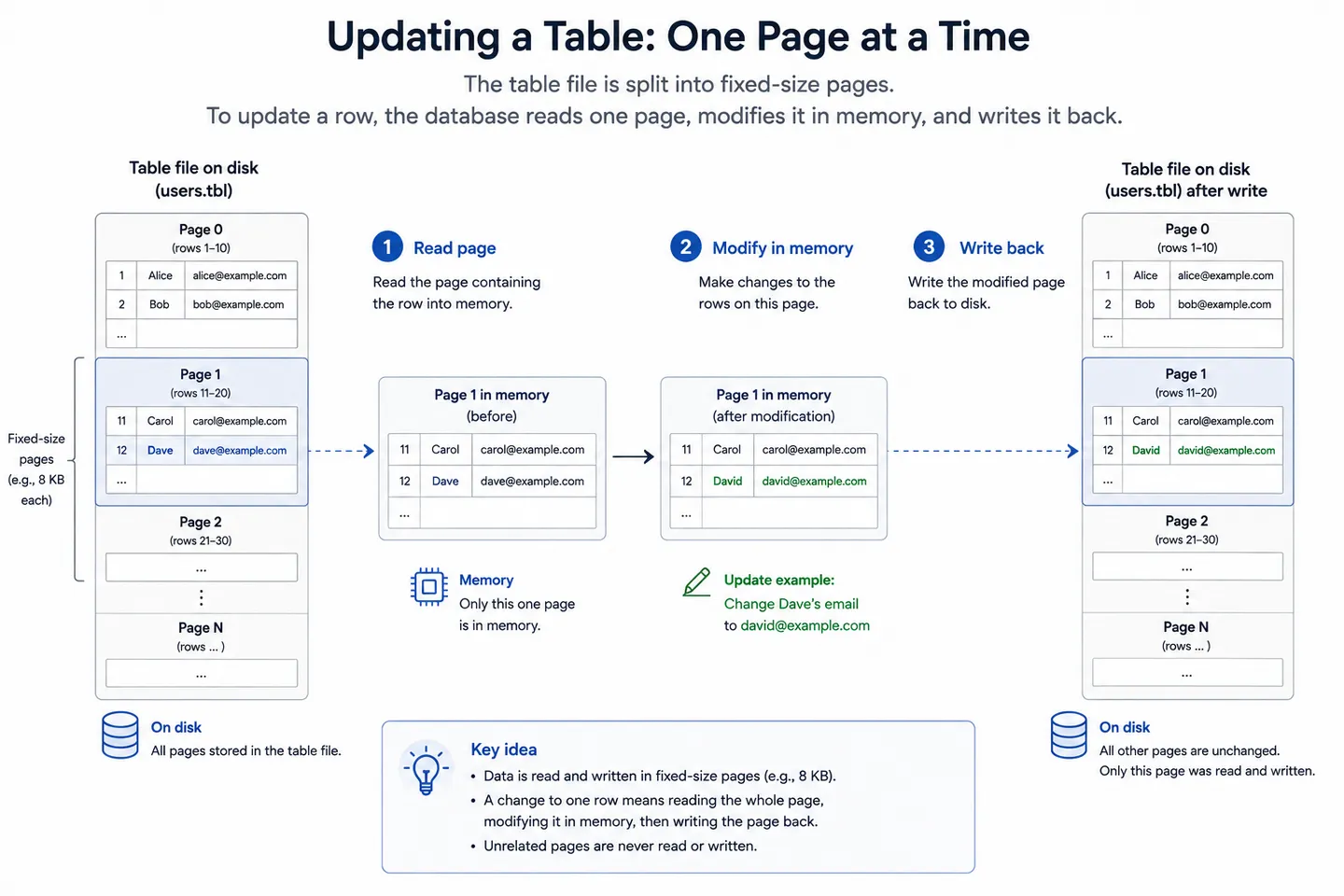
The first decision is that the file is not one continuous document. It is divided into fixed-size blocks called pages, usually 4 or 8 kilobytes each, and rows are packed into them.
   users table file
 ┌──────────┬──────────┬───────────┬──────────┐
 │  page 0  │  page 1  │  page 2   │  page 3  │
 │ rows 1-42│rows 43-88│rows 89-131│   free   │
 └──────────┴──────────┴───────────┴──────────┘
      8 KB      8 KB       8 KB       8 KB
This one choice solves the rewrite problem at the physical level. To change a single row, the engine reads the one page holding it, edits it in memory, and writes that page back. Your JSON file had to be serialised and rewritten in full for a one-character change, because there was no way to address a part of it. A page is the smallest unit the database ever reads or writes, and the size is not arbitrary either: disks, filesystems and databases all converge on similar block sizes because the hardware underneath transfers data in blocks anyway.
The buffer pool#
Pages also give memory a natural unit to work with. The engine keeps recently used pages in a region of RAM called the buffer pool, so a row that was read a moment ago is served without touching the disk at all. Reads check the pool first, and only pages that are not there cause actual disk activity.
This is where a lot of real-world database performance actually lives. A well-tuned database serves the large majority of its reads from memory, and the phrase "the database is slow" often means nothing more exotic than the working set having grown past what the buffer pool can hold. The queries did not change, the data did, and suddenly reads that were memory lookups became disk reads.
Writes go through the pool too. A modified page sits in memory marked as dirty, and gets written back to the table file later rather than immediately. Which raises the obvious question: if the change is only in memory, what happens when the machine dies?
The write-ahead log#
Writing pages back in place is the dangerous moment. A crash halfway through leaves a page that is neither the old version nor the new one, and a half-written page is worse than a lost one, because nothing about it announces that it is broken.
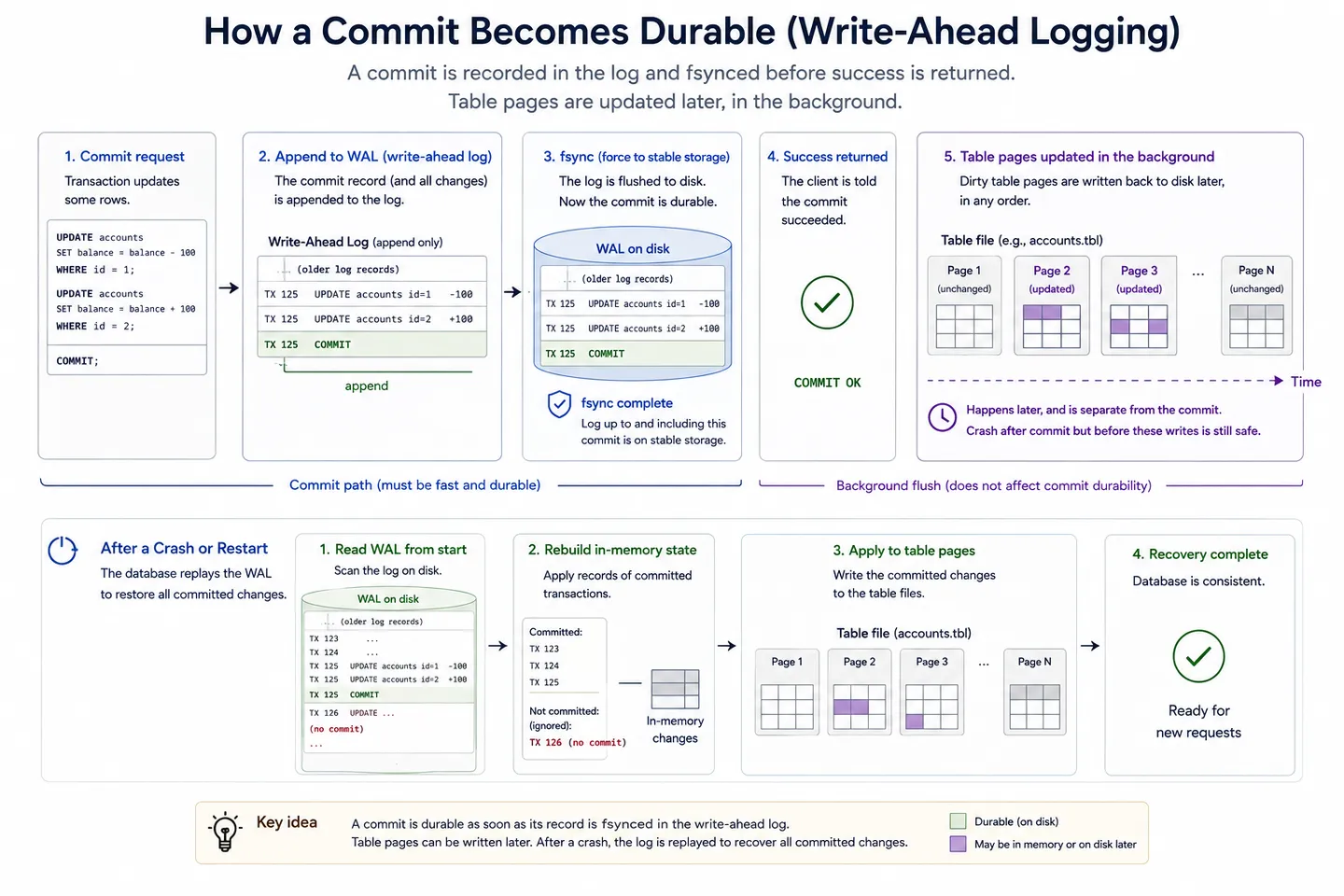
The solution is to not touch the real pages first. Before changing anything, the engine appends a description of the change to a write-ahead log, a file that is only ever written to at the end, and waits for the disk to confirm that the append is physically durable. That confirmation is the fsync call, and it is the moment the promise becomes real. Only after it returns does the database report success to you.
  COMMIT
     ↓
  append change to the write-ahead log
     ↓
  fsync            ← the disk confirms it is really there
     ↓
  report success to the client
     ↓
  update the table pages later, in the background
Why this is fast rather than slow#
It looks like extra work, and it is, but it is cheap work in the right place. An append to the end of one file is close to the least expensive thing you can ask a disk to do, because it is sequential and touches one location. Updating the actual pages is expensive by comparison, since a transaction can dirty pages scattered all over a large table file.
The log lets the database pay the cheap cost on the critical path, while you are waiting, and defer the expensive one to a background process that can batch and reorder it. That is why committing a transaction returns faster than the amount of work it implies, and it is the same trick that makes a database with careful durability guarantees outperform a naive implementation with none.
Crash recovery#
Now the payoff. If the machine dies at any point after that fsync, the log still contains every committed change that had not yet made it into the table files. On startup the engine reads the log and replays them, so nothing acknowledged is lost. It also finds transactions that were partway through with no commit record, and reverses their effects, so nothing half-finished survives either.
That single pass is why a database comes back consistent after a power cut and your JSON file does not. It is also, concretely, what the durability in ACID buys you, and why turning off synchronous commits for speed is a real decision with a real cost rather than a free tuning win.
What an index is on disk#
The last piece of the layout is the one that makes queries fast. An index is a second structure, stored in its own pages, holding the values of one column in sorted order alongside pointers to where the full rows live.
Sorted order is the entire point, because it means a lookup can halve the search space repeatedly instead of walking through everything. Most indexes are a B-tree, a deliberately shallow tree whose nodes are pages, so finding one row among ten million is typically three or four page reads rather than ten million comparisons.
                 [ M ]
            ┌──────┴──────┐
          [ F ]         [ T ]
        ┌───┴───┐     ┌───┴───┐
     A..E     G..L  N..S     U..Z
      ↓                        ↓
   row pointers into the table pages
Three levels like that already cover an enormous number of rows, which is why an indexed lookup feels instant and the same query without one crawls. It is also why the improvement is so dramatic rather than incremental: you are not making the scan faster, you are avoiding the scan.
The cost is worth stating plainly. Every index is more data on disk, and every insert, update or delete has to modify the indexes as well as the table. Indexes are not free speed, they are a trade of write cost and storage for read cost, and how to choose them well is a subject that deserves its own article.
If you would rather see all of this than take my word for it, SQLite is the readable version. Its file format documentation lays out the pages, the B-trees and the header byte by byte, for an engine that is one file on disk and running in more places than every other database combined.
What this explains in practice#
The point of knowing the layout is that a set of otherwise disconnected symptoms turn out to be the same few facts.
A bulk import that slows down as it runs is usually index maintenance, since every row inserted has to be placed into every index as well as the table. Dropping the indexes, loading the data and recreating them afterwards is a standard trick precisely because rebuilding an index once is cheaper than maintaining it a million times.
A table that keeps growing on disk after you delete rows is not a bug. Engines that keep multiple row versions for concurrency mark the old ones as dead rather than removing them immediately, leaving gaps inside pages that later writes can reuse. The space comes back to the table, not always to the filesystem, which is why database sizes tend to rise and plateau rather than shrink.
A query that was fast last month and is slow now, with no code change, is very often the buffer pool. The data grew past the point where the pages it needs stay resident, and reads that were memory hits became disk reads. That extra waiting lands squarely in the gap between the request and the first byte of the response, which is why storage problems show up first as a slow-feeling website rather than as anything obviously database shaped. The fix is more memory, a better index, or asking for less data, and knowing the layout is what tells you which of the three you are actually looking at.
Wrapping up#
Nothing at this layer is mysterious once you see the constraint the designers were working against. A disk can only promise that small, sequential, confirmed writes have really happened, and everything else has to be built out of that one guarantee.
Pages exist so a change touches a small addressable unit instead of a whole file. The buffer pool exists because memory is orders of magnitude faster and pages are the natural thing to cache. The write-ahead log exists because a durable append is cheap and a durable scattered update is not. Indexes exist because sorted data can be searched without being read.
Four ideas, and they hold across almost every engine you will meet, relational or not. The names change and the details differ, but a storage layer that did not do these things would have to invent them.
Key takeaways#
- A database stores data in ordinary files. What differs from a hand-rolled store is the discipline of how those files are written, not the storage underneath.
- Files are divided into fixed-size pages, typically 4 or 8 kilobytes, so changing one row rewrites one small block instead of the entire file.
- The buffer pool keeps hot pages in memory, and a database that suddenly feels slow has often outgrown it rather than developed a query problem.
- The write-ahead log is appended and flushed to disk before the real pages change, which is both what makes commits durable and what makes them fast.
- Crash recovery replays committed changes from the log and reverses uncommitted ones, which is exactly what durability in ACID means.
- An index is a sorted B-tree in its own pages, turning a scan of millions of rows into three or four page reads, paid for with disk space and slower writes.
Frequently asked questions#
How does a database store data on disk?#
In ordinary files, organised into fixed-size blocks called pages, usually 4 or 8 kilobytes each. Rows are packed into pages so the engine can read or rewrite one small block rather than the whole file, indexes live in their own pages as sorted trees, and a separate write-ahead log records every change before the table pages are touched.
What is a write-ahead log?#
A file the database appends every change to, and flushes to disk, before updating the actual table data. Because the log is written first, a crash can never leave the tables in an unrepairable half-finished state: on restart the engine replays committed changes from the log and reverses anything uncommitted.
What is a page in a database?#
The smallest unit of data a database reads from or writes to disk, typically 4 or 8 kilobytes. Rows are stored inside pages, and the engine loads whole pages into memory rather than individual rows, which is why the size matches the block sizes used by disks and filesystems.
What is a buffer pool?#
The region of memory where a database keeps recently used pages so repeated reads do not touch the disk. Most of a healthy database's reads are served from it, and performance often falls off when the data actively being used grows larger than the pool.
Why do indexes make writes slower?#
Because every insert, update or delete has to modify each index as well as the table itself. One table with five indexes means six structures to keep correct on every write, which is why loading large amounts of data is often faster with the indexes dropped and rebuilt afterwards.
Is SQLite a real database?#
Yes. It implements pages, B-tree indexes, transactions and crash recovery like any other engine, with the difference that it runs inside your application process instead of as a separate server. That makes it a poor fit for many machines writing at once and an excellent one for almost everything else.
Continue reading#
- What is a database?. The layer above this one: what a database guarantees, why plain files break, and the types of database engines you can choose between.
- What is a server, really?. The database is one of four jobs behind a typical website, and this covers how the others fit around it.