

You hear the word on your first day and nobody ever stops to define it. The server is down. Push it to the server. Ask the backend team to check the server. Everyone nods, the conversation moves on, and you quietly build a mental picture out of context clues.
For a long time mine was a black box in a cold room somewhere. That picture is not wrong, but it is only one third of the story, and it is the least useful third for a developer.
The reason the word feels vague is that it is doing three jobs at once. Sometimes it means a physical machine. Sometimes it means a program running on that machine. Sometimes it means neither of those and the speaker is talking about a rented slice of someone else's hardware. All three uses are correct, which is exactly why the word slides around in conversation.
So let's take the three apart, one at a time.
What is a server?#
A server is something that waits for requests and answers them.
That is the whole definition. Not a kind of hardware, not a brand, not a place. It is a role in a conversation. Something asks, something answers, and whichever side does the answering is the server for that exchange.
The other side of that conversation is the client. Your browser is a client. So is a mobile app, a curl command, or a payment provider calling your webhook. The naming describes who starts the conversation and who responds to it, nothing more.
A server is not necessarily a separate computer#
A server does not have to be a special machine sitting in a data centre. It is usually a program running on a computer.
Your laptop can be a server. Your phone can be a server. A program inside a virtual machine can be a server.
What matters is the role the program is playing: it waits for requests and responds to them.
This is why the same machine can be both. Your application server is a server when the browser talks to it, and a client the moment it turns around and queries the database. The role changes depending on which conversation you are looking at.
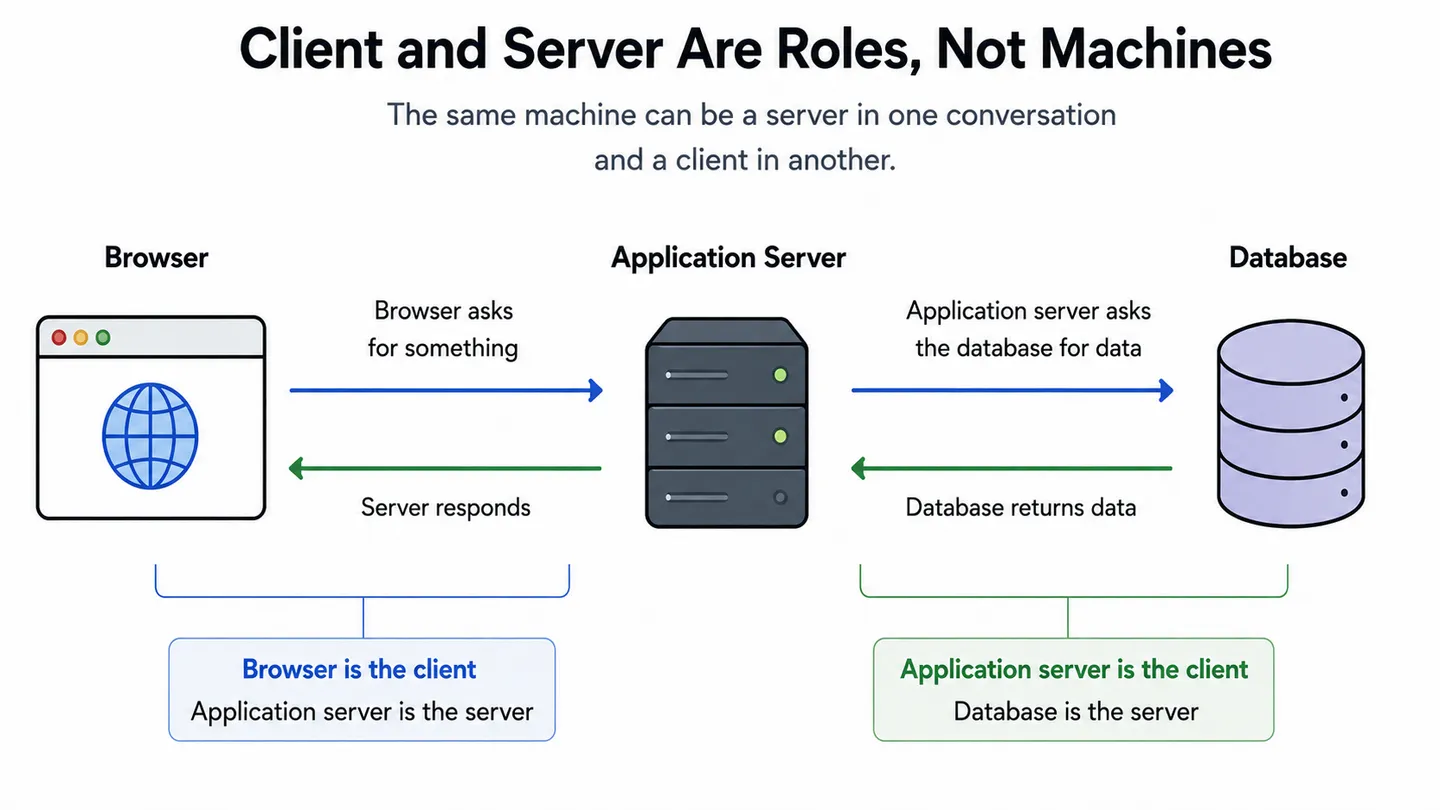
The practical consequence is that there is nothing special about the machine. The laptop you are reading this on can be a server in about ten seconds, and later in this article we will do exactly that. What makes something a server is that a program on it is listening, and that it stays running when nobody is using it.
That last part matters more than people expect. A client can make a request and disappear. A server needs to be available when the request arrives, which is where all the boring requirements come from: uptime, restarts, monitoring, and reliable infrastructure.
Is a server hardware or software?#
Now the confusing part. When someone says "the server", they might mean the metal or they might mean the program, and the sentence usually does not tell you which.
When server refers to hardware, it usually means a computer designed to run services reliably and continuously, often with features that make it easier to operate and maintain remotely. No monitor, no speakers, no concern for looking nice. Instead it has redundant power supplies so one failure does not take it offline, error-correcting memory that catches bit flips instead of quietly corrupting data, drives designed to spin for years, and a flat shape so it slides into a rack with dozens of others. It is optimised to run unattended for a very long time.
The software meaning is a program that listens on a port and answers requests. Nginx is a server. Postgres is a server. The Node process running your API is a server. None of them are objects you could drop on your foot.
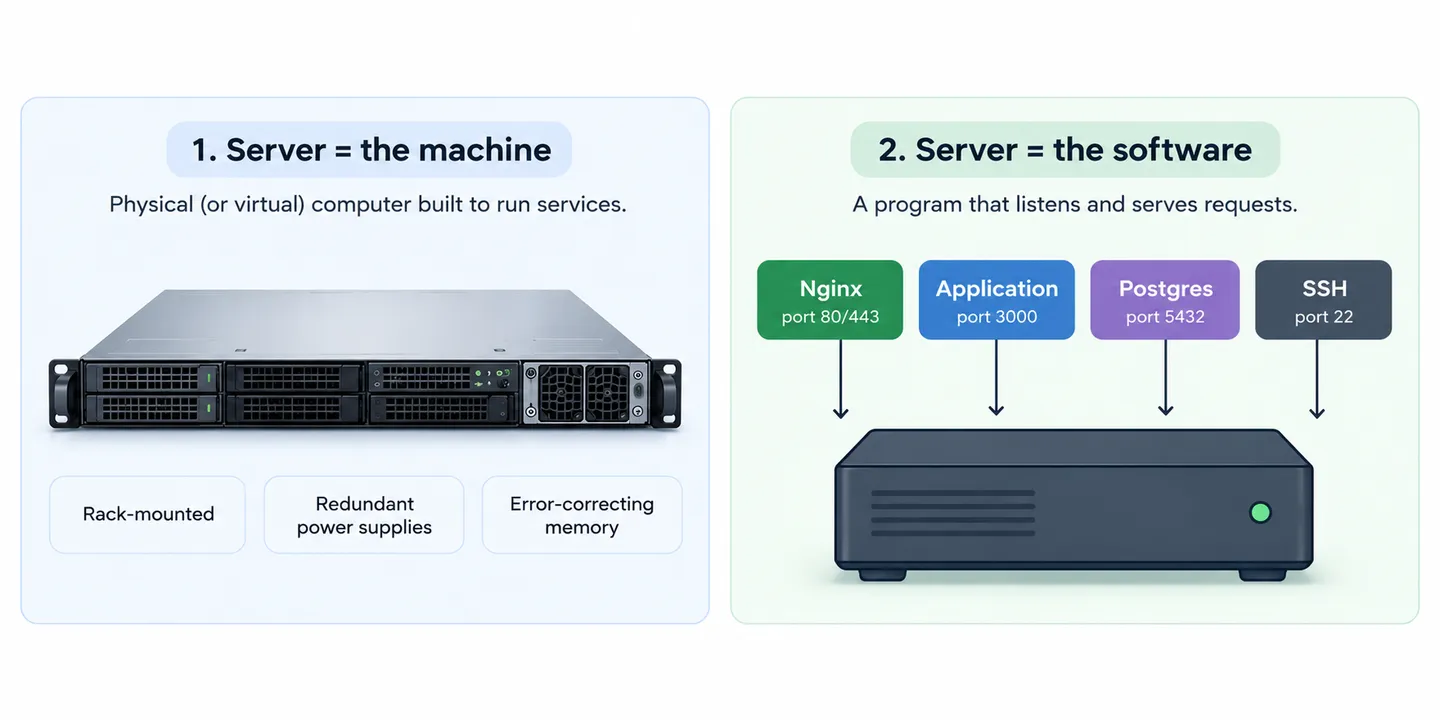
One physical machine usually runs several of these at once:
        One physical machine
 ┌───────────────────────────────┐
 │  Nginx        listening :443  │
 │  Your app     listening :3000 │
 │  Postgres     listening :5432 │
 │  SSH daemon   listening :22   │
 └───────────────────────────────┘
     four servers, one computer
This is why "the server is down" is such an unhelpful sentence. The machine could be off, or the machine could be perfectly healthy while one process on it crashed. Those are completely different problems with completely different fixes, and the word covers both.
Worth knowing the habit: when a developer says server they almost always mean the software, and when someone from operations says it they usually mean the machine.
How does a server handle a request?#
Underneath every server, whatever it is written in, sits the same loop.
It opens a port and waits. A connection arrives. It reads the request, works out what is being asked, does whatever work that requires, writes a response back, and goes straight back to waiting. That is the entire lifecycle, repeated a few thousand times a second on a busy day.
Here is the loop as actual code, which is the fastest way to prove that a server is not a mysterious thing:
import express from "express";

const app = express();

app.get("/", (request, response) => {
  response.send("Hello from a server");
});

app.listen(3000);
A handful of lines, and your laptop is now a server. It is listening on port 3000, and anything that can reach that port can ask it for a response. The fact that this is possible in Javascript at all is a fairly recent development.
In HTTP/1.1, the request is transmitted as a text-based message. When a browser talks to a web server, it sends a request describing what it wants, followed by headers that describe who is asking and what they can accept. The server replies with a status code, its own headers, and the body. You can follow that whole journey from the address bar to the pixels here.
Two properties of this loop shape almost everything else.
The first is that HTTP is stateless. The connection underneath may be reused for several requests, but the server does not automatically retain application state from one request to the next. Unless you build something on top, it has no way to know that the request it is handling came from the same person who logged in a minute ago. Everything about staying logged in exists to work around this.
The second is that requests do not politely queue up one at a time. Hundreds can be in flight at once, and how a server handles that overlap is the main thing separating one server technology from another.
What are the main types of servers?#
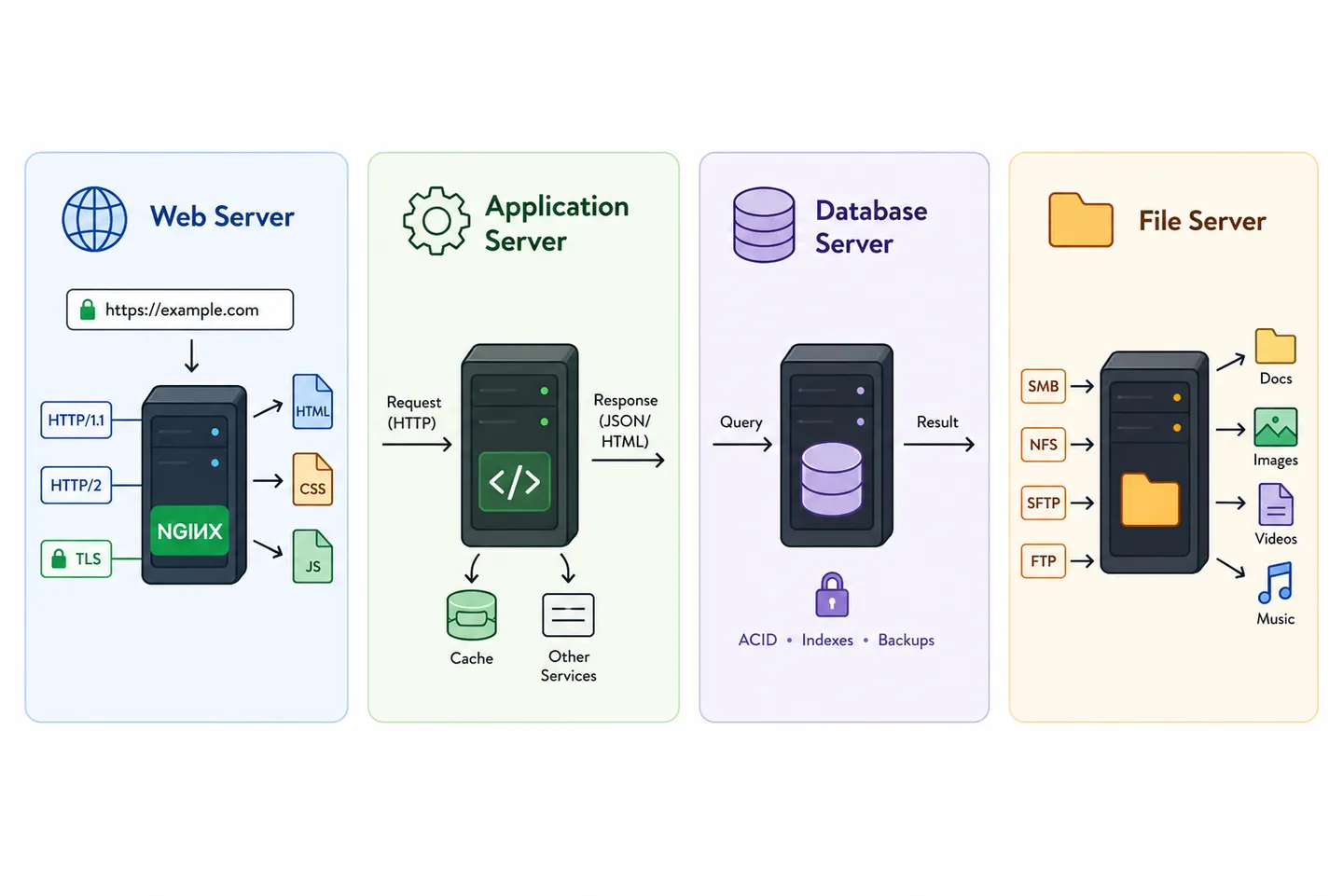
Here is the thing that took me embarrassingly long to notice. When people say web server, database server or file server, they are not describing four different kinds of computer. They are describing four different jobs, and the same box can do all of them at once.
The names tell you what the software does, not what the hardware is.
What is a web server?#
A web server speaks HTTP. Its job is to accept connections from the outside world and deal with the parts of a request that have nothing to do with your business logic.
MDN describes the same split in its own introduction to what a web server is, hardware on one side and software on the other, which is a good sign that the confusion is not just you.
Nginx and Apache are some of the most common ones you will meet. They serve static files straight off disk, handle the TLS handshake so your traffic is encrypted, compress responses, and pass anything dynamic along to whatever actually generates it. That last job is called reverse proxying, and it is why a web server usually sits in front of your application rather than containing it.
If a request is for /logo.png, the web server answers it alone and your code never runs. If the request is for /checkout, it hands it onward.
What is an application server?#
An application server runs your code. This is the layer where a URL becomes a decision: check who is asking, read from the database, apply the rules, build a response.
Your Express API, your Rails app, your Django project and your Spring service all sit here. The distinction from a web server used to be sharp, because the thing running your code was not built to face the open internet and needed something hardened in front of it. Modern runtimes blur it, since a Node process can happily terminate TLS and serve static files itself. Most production setups still keep the two separate, because the boring layer is very good at the boring work and there is no reason to make your application do it.
What does a database server do?#
A database server owns the data and answers questions about it. Postgres, MySQL, MongoDB and Redis are all servers by the definition we started with, they just do not speak HTTP.
Postgres listens on port 5432 and speaks its own protocol, so you talk to it with a client library rather than a browser. It handles the things you would not want to write yourself: concurrent writes without corruption, transactions that either fully happen or fully do not, indexes that turn a full scan into an instant lookup, and rules about what happens when two people edit the same row at the same moment.
One detail matters more than the rest. A database server should not be reachable from the internet. Only your application should be able to open a connection to it, because a database exposed to the world is the shortest path between a small misconfiguration and a very bad week.
What is a file server?#
A file server stores files and hands them out over a network. Inside a company this is the shared drive that appears on everyone's machine, usually running SMB on Windows networks or NFS on Unix ones, so the files feel local while living somewhere else entirely.
One protocol commonly associated with file servers is FTP, the File Transfer Protocol. For years, it was a common way to upload a website to a host: connect, drag your folder across, done. Today, encrypted alternatives such as SFTP are generally preferred when transferring files over untrusted networks.
The modern version of this job usually is not a file server at all. Object storage like S3 does the same thing over HTTP, with the network drive metaphor dropped completely.
How do web, application and database servers work together?#
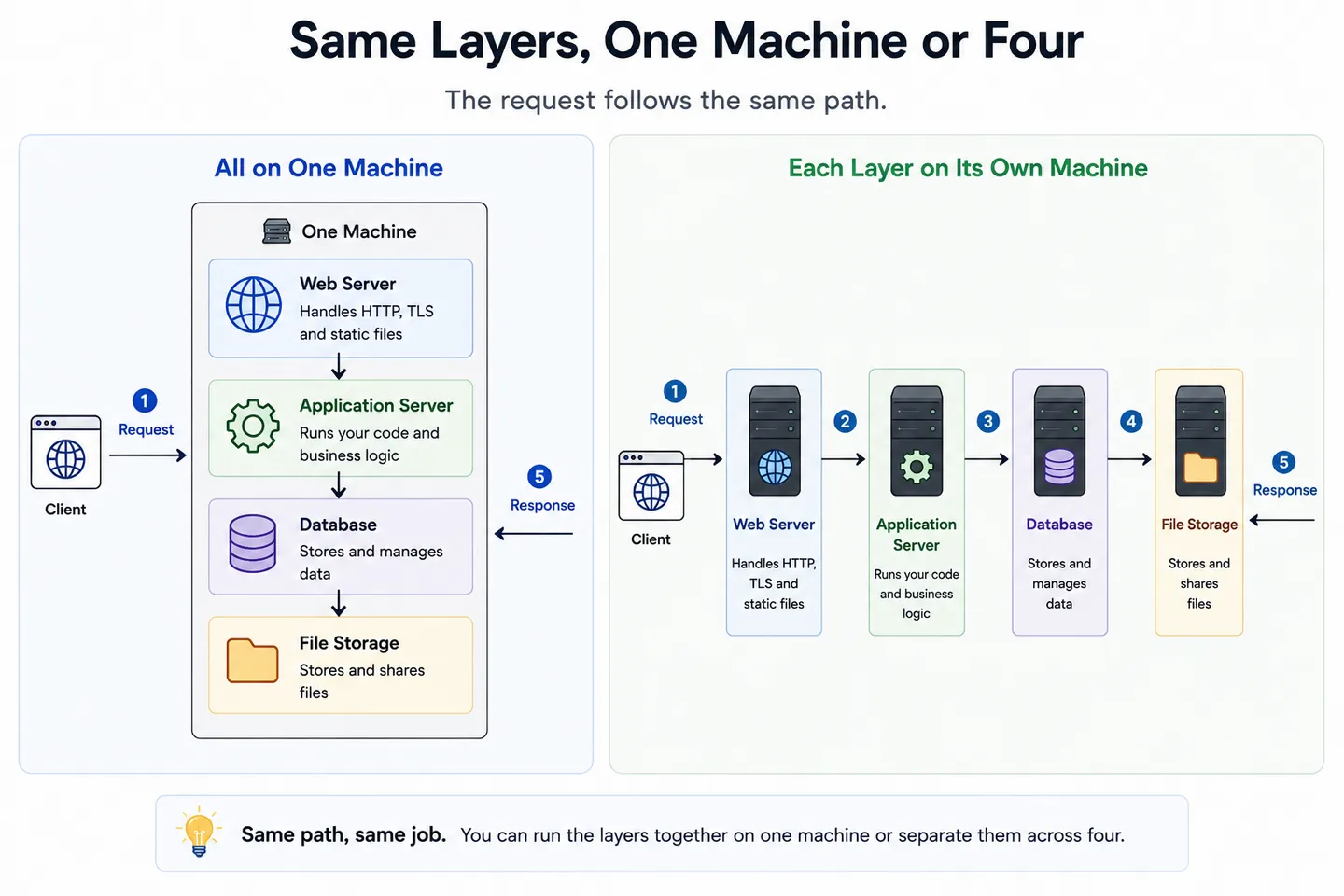
Put the main application layers in a line and a normal request looks like this:
   Browser
      ↓
  Web server        TLS, static files, routing
      ↓
 App server         your code, your rules
      ↓
 Database server    the data itself
      ↓
   Response back up the same path
Each layer does one job and hands the rest along. That is the shape behind most of the web, whether the thing serving you is a personal blog or a bank.
What throws people is that this diagram says nothing about how many computers are involved. On a small site all four layers run on one rented machine that costs a few euros a month, and that is a completely legitimate way to run a real application. On a large one, each layer is a separate cluster and there are load balancers, caches and queues in the gaps.
The layers stayed the same. Only the machine count changed.
Splitting them apart buys you the ability to scale each piece independently and to fail in smaller pieces, and it costs you the fact that a function call becomes a network call that can time out. That trade is the same one at the centre of monoliths versus microservices, one level further up.
An example: Vite and Express#
If the layers still feel abstract, here is a stack a lot of people actually run, and the confusion that comes with it. Both answers feel correct depending on when you look.
In development, you are running two servers at once. Vite serves your frontend on port 5173, keeps a connection open so the page updates the moment you save a file, and forwards anything starting with /api to Express on port 3000. Express runs your routes and talks to the database.
   Browser
      ↓
  Vite dev server  :5173    frontend files, hot reload
      ↓                     /api → :3000
  Express          :3000    your code, your rules
The important bit is that the browser only knows about port 5173. If your frontend calls /api/products, the browser sends that request to the same origin it got the page from.
Vite receives it and, because of the proxy setting in your Vite config, forwards the request to Express.
So Express is handling the API request, but the browser never talks to port 3000 directly. This is useful in development because your frontend can call /api/products without having to know where the API server is running, and Vite can take care of forwarding it.
Two processes, two jobs, one browser-facing port.
Then in production, Vite is not there any more. This surprised me the first time I looked for it. Running vite build happens once, writes finished files into a dist folder, and exits. Vite is a build tool that happens to include a dev server for your convenience, not something your application normally runs in production.
So in production the question becomes: who serves that dist folder, and who receives the API requests?
There are a couple of perfectly normal answers.
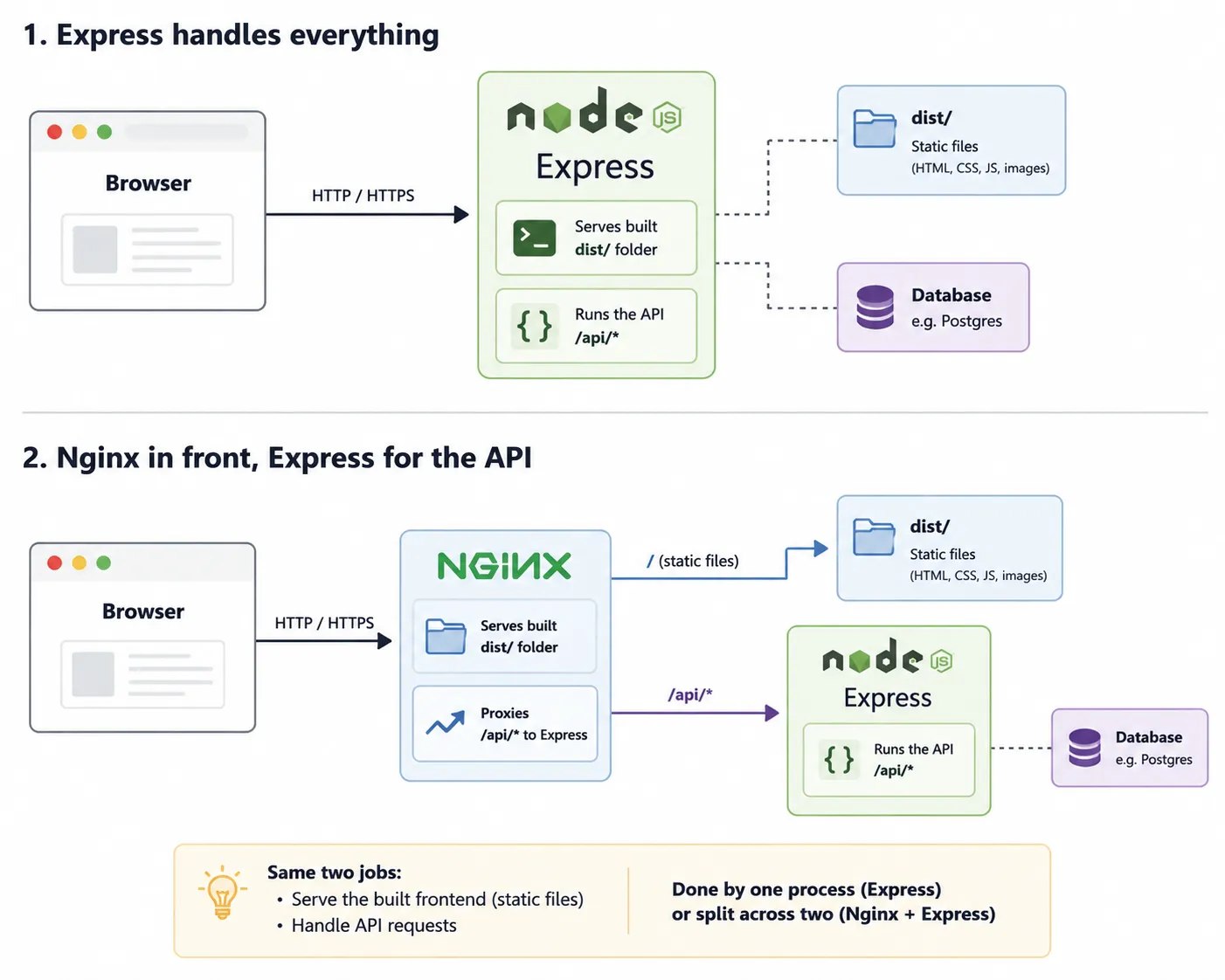
In the first setup, Express is doing both jobs in a single process. It serves the finished frontend files and runs the API.
In the second, Nginx sits in front. It serves the static files itself and forwards only /api requests to Express:
So why use Nginx at all if Express can already serve the files?
Because serving a few files is easy. Handling the boring infrastructure around those files is something Nginx is very good at. It can terminate HTTPS, serve static files efficiently, compress responses, add caching rules, handle connections, and act as a reverse proxy in front of one or several application processes.
That separation also means Express can concentrate on your application: authentication, business rules, database queries and API responses. Nginx handles the traffic coming in from the outside world.
You do not always need it. A small application can perfectly well have Express serve the frontend and API itself. Nginx becomes useful when you want to separate those responsibilities or need the extra infrastructure features around your application.
And this is the whole point again: these are jobs, not products. Express can perform the application-server job and, in some setups, the web-server job too. Nginx can perform the web-server and reverse-proxy jobs. Asking which one is "the web server" only has an answer once you say which setup, and which moment, you are talking about.
Other types of servers: proxy, DNS, VPS and MCP#
Four types cover the stack behind a website, but the naming pattern keeps going, and the same rule applies every time. The word in front tells you the job.
A proxy server sits between a client and a server and passes traffic along, either to protect the client's identity on the way out or to shield and cache for the server on the way in. A DNS server answers the question of which IP address a domain name points to, which is a whole journey of its own that a single DNS lookup walks through step by step. A DHCP server hands out local IP addresses when a device joins a network, which is why your laptop gets an address the moment it connects to wifi without you configuring anything. A mail server moves email around.
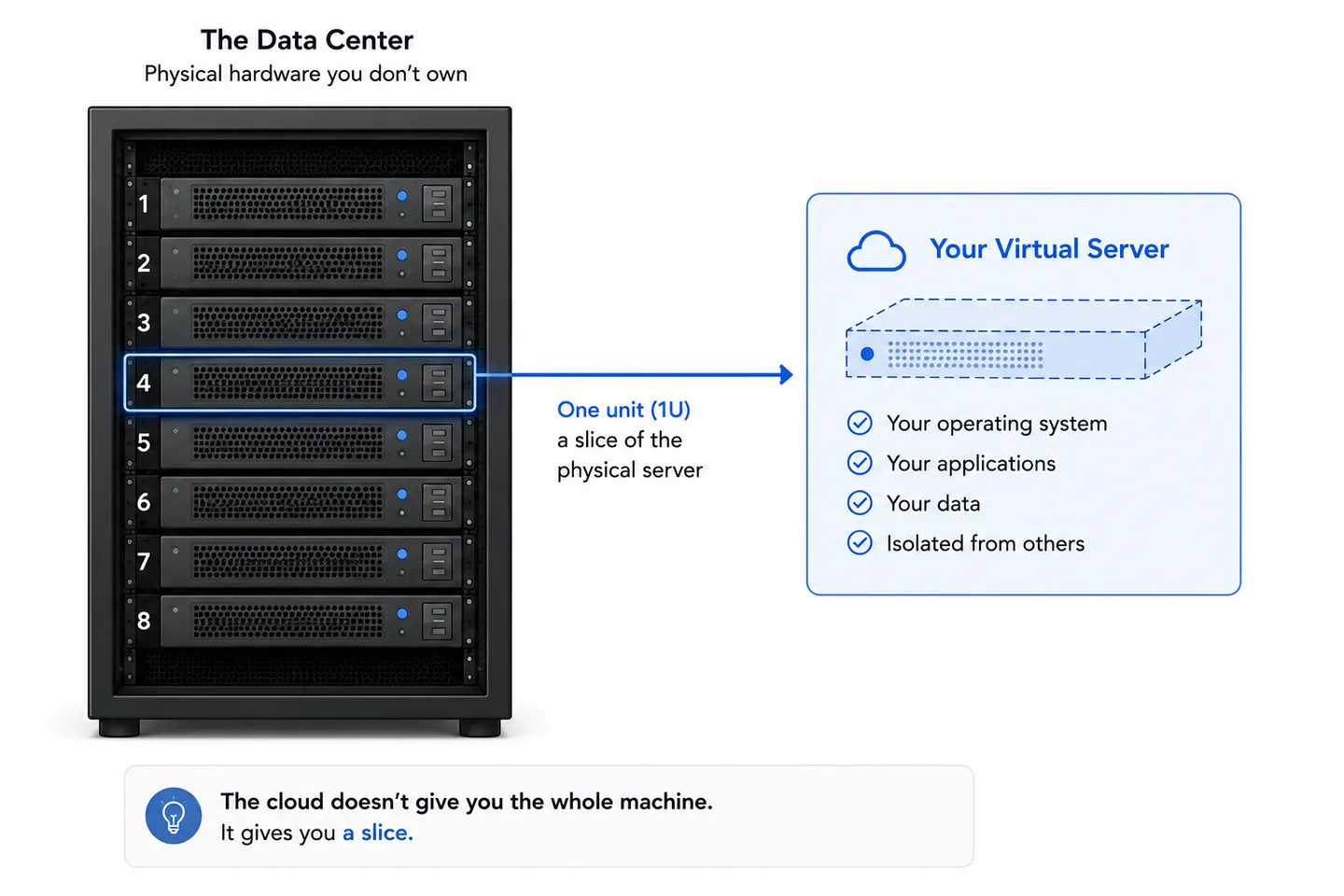
One name in that family breaks the pattern, and it is worth calling out. A VPS, or virtual private server, does not describe a job at all. It describes ownership: a slice of a bigger physical machine, rented to you, that behaves like a whole computer you control. What you run on it is entirely your business.
What is an MCP server?#
The newest name in the family is the one that confuses people most, because it arrived attached to AI and everyone assumed it must be something exotic. An MCP server, from the Model Context Protocol, is a program that exposes tools and data to an AI model in a format the model can call. Your editor's assistant wants to read a file, query your database or open a pull request, and an MCP server is the thing sitting on the other side of that request, deciding what it is allowed to do and handing back the answer.
Held up against the definition we started with, it fits perfectly. Something waits, something asks, an answer comes back. What changed is only who is doing the asking. For thirty years the client was a browser or another program written by a human, and now it can be a model deciding on its own that it needs the contents of a file. The protocol is new, the shape is not, and that is genuinely the whole trick.
Game servers, media servers and time servers#
The pattern keeps going well past web development, and the further out you go the clearer it gets that the word is doing the same job every time. A game server holds the authoritative state of a match and tells every connected player what actually happened, which is the same trust problem a web application has, at sixty updates a second. A media server sits on a machine at home and streams your own files to whatever device asks for them. A time server answers one very small question, what time is it, and it matters more than it sounds, because certificates, logs and distributed systems all fall apart quickly when two machines disagree about the clock.
Different protocols, different ports, different problems. Same loop underneath.
Where do servers live? Data centres, server racks and the cloud#
The hardware meaning has to physically be somewhere, and that somewhere is almost always a data centre.
Inside one, machines are mounted in a server rack, a metal frame a bit under two metres tall holding equipment in standard slots. Each slot is a rack unit, or 1U, about 4.4 centimetres high, which is why servers are sold as 1U or 2U and why they are so unnaturally flat. Stacking them this way means one rack can hold dozens of machines while keeping cabling manageable and letting cold air flow through the front and out the back.
The building around the racks is the actual product. Redundant power feeds with battery backup and generators, cooling that runs constantly because a rack of machines produces a serious amount of heat, multiple independent network connections, and physical security. Very few companies want to own any of that, which is where the cloud comes in.
"The cloud" is not a technology, it is an arrangement. Someone else buys the racks, staffs the building, replaces the failed drives, and rents you the use of the machines by the hour. Virtualisation is what makes it work: one physical machine is divided into many isolated virtual ones, so you get a computer that behaves like it is yours while sharing hardware with strangers.
Nothing about the definition changed. Your code still runs on a specific machine, in a specific building, in a specific country. The only thing that changed is whose name is on the invoice for the hardware, and how quickly you can get another one.
Wrapping up#
The word stops being vague once you know it is carrying three meanings. A machine that stays on, a program that listens, and a rented slice of someone else's hardware. When a sentence confuses you, it is almost always because two people in the room picked different meanings.
Underneath all three is the same small idea. Something is waiting, something asks, an answer comes back. Every type in this article is a variation on that one loop, differing only in what it listens on and what it does before it replies.
Keeping the roles straight also changes how you think about safety. Once you can see that the client and the server are two separate computers owned by two separate people, it becomes obvious why a server can never trust your browser, and a large part of web security follows from there.
Key takeaways#
- A server is a role, not a kind of machine. Whatever answers a request is the server for that exchange, and the same computer can be a server in one conversation and a client in the next.
- The word carries a hardware meaning and a software meaning at the same time, which is why "the server is down" can describe two completely different problems.
- Every server runs the same loop: listen on a port, read a request, do the work, write a response, wait again.
- Web, application, database and file servers are four jobs rather than four machines, and on a small site all four run on one computer.
- The cloud does not remove the physical machine. It changes who owns the rack and how fast you can rent another slot in it.
Frequently asked questions#
Is a server just a normal computer?#
Mostly yes, with different priorities. Server hardware drops the things a desktop needs, like a monitor and a sound card, and adds redundant power supplies, error-correcting memory and a flat shape that fits a rack. Any ordinary computer can act as a server the moment it runs a program that listens for requests.
What is the difference between a web server and an application server?#
A web server handles HTTP itself: encryption, static files, compression, and passing dynamic requests onward. An application server runs your code and produces the answers. In production they are usually separate processes, with the web server sitting in front, though modern runtimes can do both jobs in one.
Can my laptop be a server?#
Yes, and it already is one whenever you run a dev server locally. The difference between that and production is not the hardware, it is that a production server has a public address, stays on permanently, and is expected to survive restarts and failures without anyone watching.
What is a server rack?#
A server rack is a standard metal frame that holds servers and network equipment in stacked slots. Each slot is one rack unit, or 1U, about 4.4 centimetres high, which is why servers are described as 1U or 2U. Racks keep dozens of machines in a small footprint with predictable cabling and airflow.
Do I need my own server to host a website?#
No. Managed hosting, static hosting and serverless platforms all run your site on servers that someone else operates and configures for you. There is still a server answering every request, you are simply not the one maintaining it.
Continue reading#
Two articles pick up directly where this one stops, one on the security side and one on the architecture side.
- Why a server can never trust your browser. Now that the client and the server are two clearly separate machines, this is what follows from it, and it is where most web security starts.
- Monolith vs microservices explained. What actually happens when you take the layers from this article and split them across separate machines, and what that costs you.