

Every application you have ever built needed to remember something. A user signed up, an order was placed, a setting was changed, and that fact had to survive the request that created it. The moment your program exits, everything in memory is gone, so the data has to go somewhere else.
The usual answer is "put it in the database", and that sentence gets repeated so often that nobody stops to ask what the database is actually doing for you. I used it for years as a place where data goes, roughly a spreadsheet with a login. That picture is not wrong exactly, but it hides the interesting part, which is that almost everything a database does is there to solve a problem you would have hit anyway.
So let's do this the other way around. Instead of starting with tables and SQL, let's start with a file, break it, and see what has to be invented to fix it.
What is a database?#
A database is an organised collection of data, stored in a way that lets you find, change and protect it reliably while many things are using it at once.
The important half of that sentence is the second half. Storing data is the easy part, and your filesystem already does it. What a database adds is a set of guarantees about what happens when things go wrong: two people writing at the same moment, a process crashing halfway through an update, a query that must not read half-finished work. Everything else, the tables, the query language, the indexes, exists to serve those guarantees.
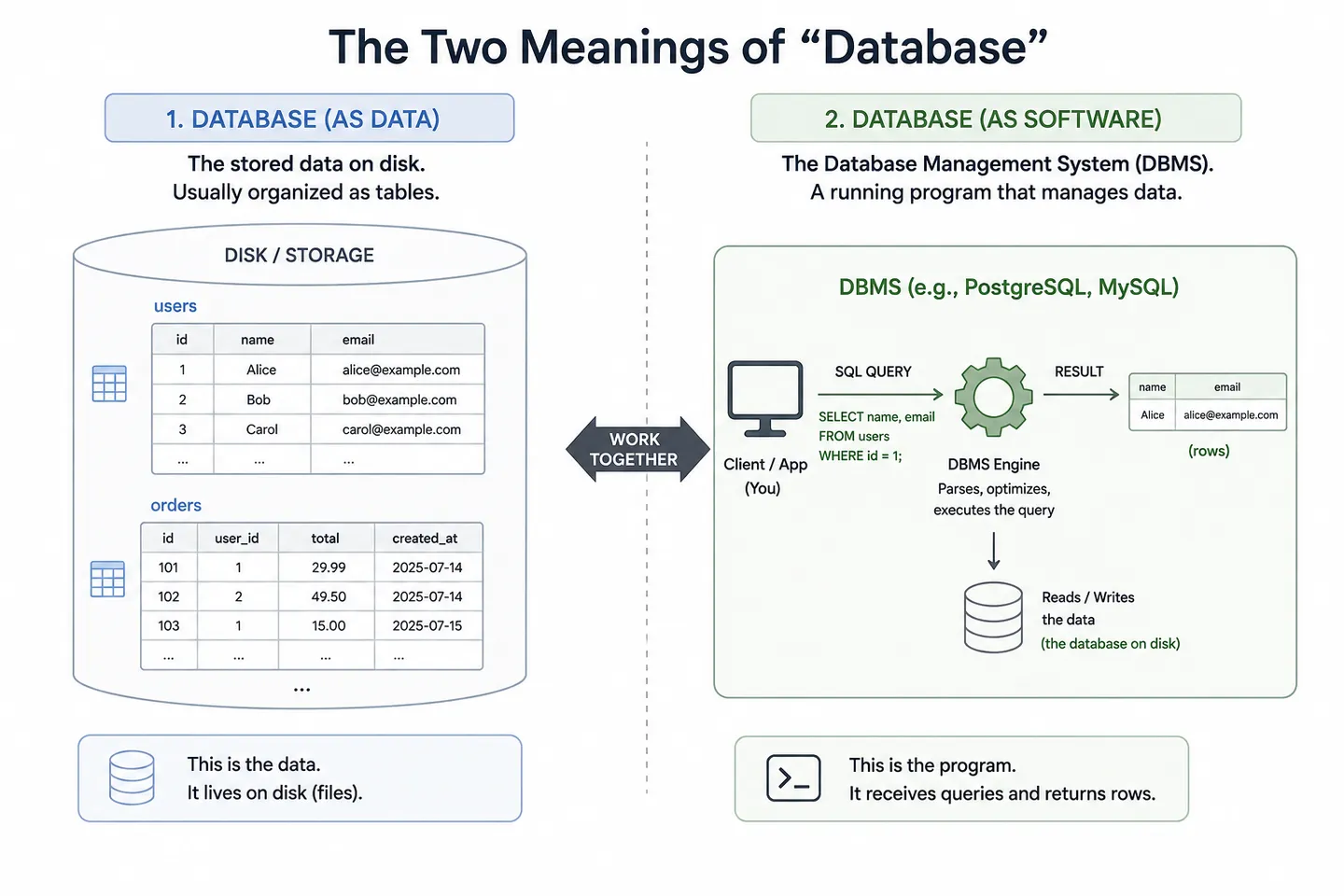
Worth separating one piece of vocabulary early, because it causes real confusion later. The database is the data itself. The DBMS, or database management system, is the software that owns it and answers questions about it. Postgres, MySQL, SQLite and MongoDB are database management systems. In everyday conversation people say "database" for both, which is fine, right up until someone says "the database is down" and you cannot tell whether they mean the data is corrupted or a process stopped listening.
Why not use plain files?#
Here is the honest version of how most of us first solve this problem. You have some users, you have JSON, and you have a filesystem.
import { readFile, writeFile } from "node:fs/promises";

async function addUser(user) {
  const users = JSON.parse(await readFile("users.json", "utf8"));
  users.push(user);
  await writeFile("users.json", JSON.stringify(users));
}
This works. It genuinely works, and for a script that runs once on your laptop it is the correct amount of engineering. It also contains four separate disasters waiting for the day something real happens to it, and walking through them is the fastest way to understand what a database is for.
Two writes at the same time#
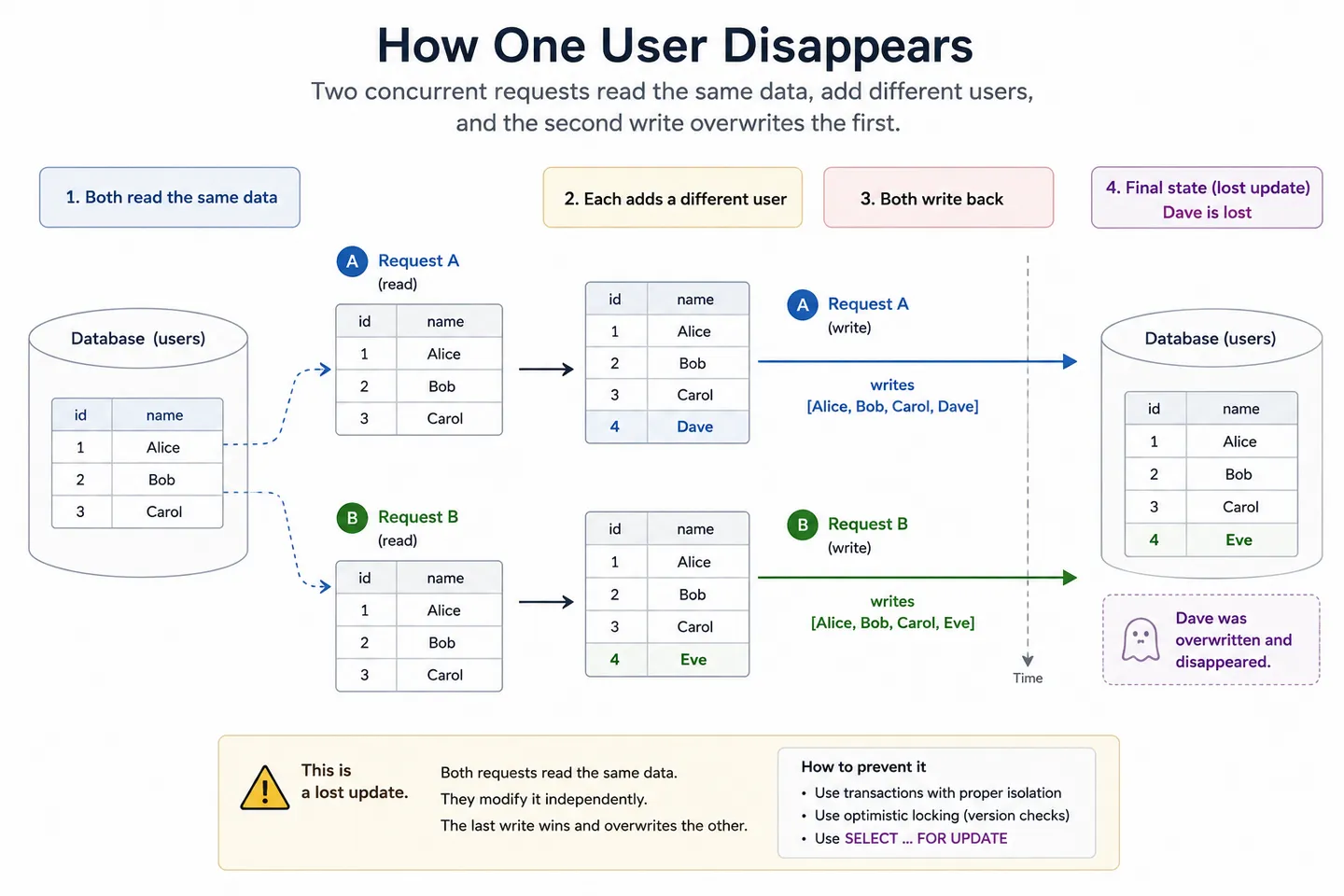
Two requests arrive within a few milliseconds of each other. Both read the file and both get the same array of a hundred users. The first adds Ana and writes a hundred and one users. The second, working from the copy it read before Ana existed, adds Bruno and writes its own hundred and one users over the top.
  Request A                Request B
      ↓                        ↓
  read 100 users          read 100 users
      ↓                        ↓
  add Ana                  add Bruno
      ↓                        ↓
  write 101                write 101
                               ↓
                     Ana is gone forever
Nothing errored. No log line appeared. Ana filled in a signup form, saw a success message, and does not exist. This is called a lost update, and the thing that makes it genuinely nasty is that it happens more often the more successful you are, and it leaves no evidence behind.
The crash in the middle#
Now imagine the write itself is interrupted. The process is killed, the container is recycled, the machine loses power. Your file is halfway through being replaced, so what is on disk is not the old list and not the new one. It is a truncated fragment of JSON that will throw a parse error on the next read, and the previous good version is already gone.
A single write is bad enough. Real operations are usually several writes that only make sense together, like taking money out of one account and putting it into another. If the machine dies between the two, the money has left one place and arrived nowhere, and no amount of careful coding on your side can make two separate file writes happen as one indivisible event.
Finding one thing means reading everything#
To find the user with the email address you were given, you read the entire file into memory and loop. At a hundred users that is instant. At ten million it is a very slow request that also allocates a few gigabytes of memory to answer a question about one row.
The fix is to keep a second structure on the side that maps email addresses to positions in the file, so you can jump straight there instead of scanning. That is an index, and it is the single biggest reason a database can answer in milliseconds what your loop answers in minutes. For now it is enough to know that the database keeps extra sorted copies of your data specifically so it never has to read all of it, and what that looks like on disk is worth seeing once.
Relationships have nowhere to live#
Users have orders, orders have line items, line items point at products. In one JSON file you either nest everything, which means the same product description is duplicated in ten thousand orders and updating it means rewriting all of them, or you split into several files and hand-maintain the references between them. Then you delete a user and their orders are still there, pointing at somebody who no longer exists, and nothing in your system considers that an error.
What does a database actually give you?#
Every one of those failures has a name and a solution, and those solutions are what you are buying when you install Postgres instead of writing to a file.
Transactions: all of it, or none of it#
A transaction is a group of operations that the database treats as a single indivisible step. Either every statement inside it takes effect, or none of them do, and there is no state in between that anyone can observe.
BEGIN;
UPDATE accounts SET balance = balance - 100 WHERE id = 1;
UPDATE accounts SET balance = balance + 100 WHERE id = 2;
COMMIT;
If the power goes out after the first update, the database does not leave you with money that vanished. On restart it notices the transaction never committed and rolls it back, and the accounts look exactly as they did before anyone tried. This is the guarantee that plain files cannot give you at any price, because the filesystem has no concept of "these two changes belong together".
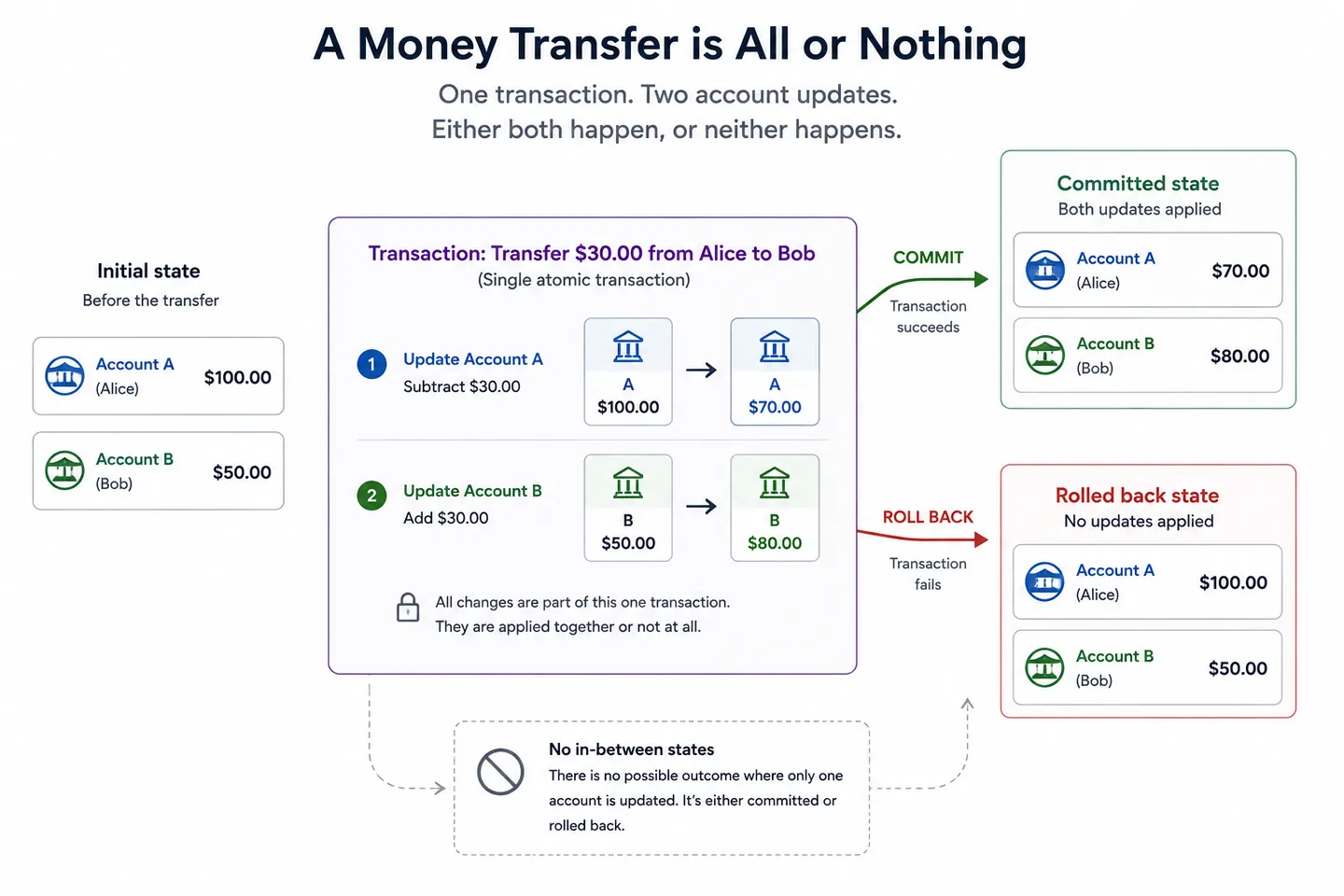
Those guarantees are usually described with the acronym ACID: atomicity (all or nothing), consistency (the data obeys its rules before and after), isolation (concurrent transactions do not see each other's half-finished work) and durability (once it says committed, it survives a crash). The PostgreSQL documentation on transactions walks through the same bank transfer example, which tells you how central this one scenario is to the whole design.
Concurrency: many writers, one truth#
Isolation is the answer to the lost update from earlier. The database does not let two transactions read the same row, decide independently, and both win. Depending on the engine and the isolation level, it either makes the second one wait until the first has finished, or lets both proceed optimistically and refuses to commit the one whose assumptions turned out to be stale.
You still have to ask for the right behaviour. Reading a balance in one statement and writing a new one in another is the same race you had with files, even inside a transaction, which is why UPDATE accounts SET balance = balance - 100 is safer than reading the balance into your application and sending back a number you calculated yourself. The database can only protect what it can see, so the more of the logic you express as a single statement, the more of it is covered.
Durability: what committed really means#
When a database returns success on a commit, the change is already somewhere that survives a crash. Not necessarily in the table itself, which might still be sitting in memory waiting to be written out, but in a record on disk that is enough to reconstruct it. That record is called the write-ahead log, and it is the trick that lets a database be fast and safe at the same time rather than trading one for the other.
A query language instead of a loop#
With files, the code that answers a question is your code. You read everything, filter, sort, count, and if you want the ten most recent orders per customer you write that yourself and hope it is efficient. SQL inverts that. You describe the result you want, and the engine's query planner decides how to get it, which index to use, which order to join the tables in, whether to sort or hash.
SELECT u.email, COUNT(o.id) AS orders
FROM users u
LEFT JOIN orders o ON o.user_id = u.id
GROUP BY u.email
HAVING COUNT(o.id) > 5;
That question, asked over millions of rows, would be a genuinely difficult program to write by hand and an even harder one to keep fast. Here it is five lines, and the planner rewrites the strategy on its own as the data grows and the shape of the tables changes.
Constraints: rules the data cannot break#
The last thing a database gives you is the ability to state what must always be true, and to have those rules enforced no matter which piece of code is doing the writing. A column can be declared unique, so two accounts can never share an email address. A foreign key can require that every order points at a user that actually exists, so deleting a user either cleans up their orders or is refused outright. A NOT NULL says this field is never allowed to be missing.
This matters more than it first appears, because your application is not the only thing that will ever touch this data. There will be a migration script, an admin panel, a background job, a colleague fixing something by hand at eleven at night. Validation in your application protects one path in, and the same reasoning that explains why a server can never trust your browser applies one layer deeper: the database should not fully trust the application either. Constraints are the last line, and they hold for every path.
Under the hood, it is still files#
Worth deflating one thing before moving on, because it makes the rest easier to think about. A database is a program storing your data in files on an ordinary filesystem. There is no exotic storage layer underneath. Open a Postgres data directory and you find files, and a SQLite database is one single file you can copy with cp.
So the difference between a database and your users.json is not where the bytes live. It is the discipline with which they are written, and it comes down to three ideas. The file is divided into fixed-size blocks called pages, so changing one row rewrites one small block instead of everything. Changes are appended to a write-ahead log and confirmed on disk before the real pages are touched, which is what makes a commit both durable and fast. And a sorted structure called an index is kept alongside the data, so a lookup never has to read all of it.
That layer explains more than it first appears, including why adding an index slows down your inserts and why a database that suddenly feels slow has usually outgrown its memory rather than developed a query problem. How a database stores data on disk goes through all of it properly.
What are the different types of databases?#
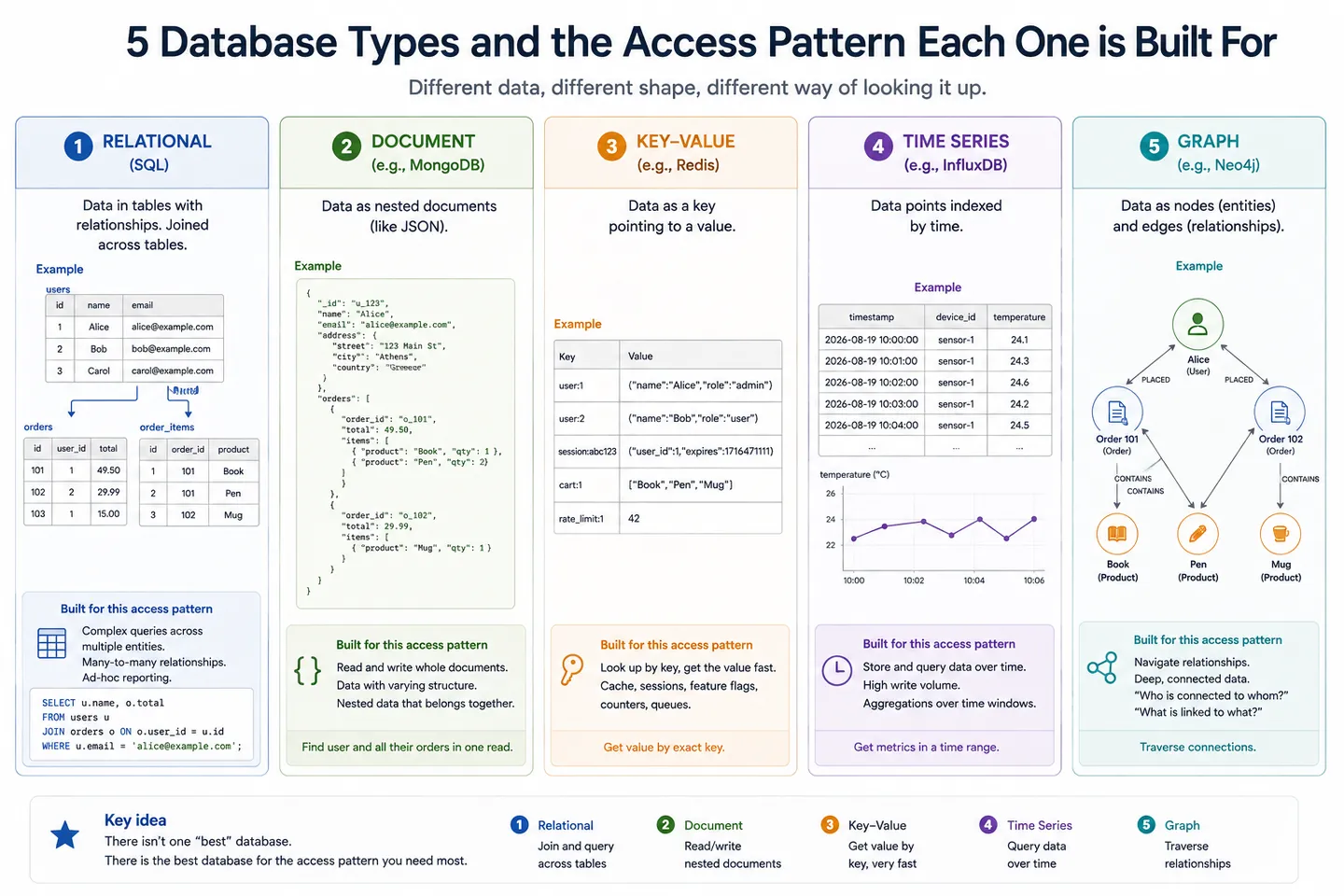
Everything so far describes the shape most people mean by "a database". It is not the only shape, and the different types of databases exist because they make different trades against the same set of problems.
What separates one database type from another is the database structure, meaning how records are organised and how relationships between them are expressed. That single decision determines which questions the engine can answer quickly and which ones it has to work hard for. You will also see these described as types of database management system, since strictly it is the software that differs rather than the data sitting inside it.
Four types cover almost everything you will meet in practice, followed by a group of specialists built for one access pattern each.
| Database type | How the data is structured | Best at | Examples |
|---|---|---|---|
| Relational | Tables of rows and columns, with a fixed schema and keys linking tables | Enforced correctness, complex queries across related data | PostgreSQL, MySQL, SQLite |
| Document | Self-contained nested documents, usually JSON, with no required schema | Irregular shapes, reading a whole record in one lookup | MongoDB, CouchDB |
| Key-value | One key pointing at one value, usually held in memory | Speed, caching, sessions, counters | Redis, Memcached |
| Wide-column | Rows grouped by partition key across many machines | Very high write volume at large scale | Cassandra, HBase |
| Specialists | Whatever suits one access pattern | Time series, search, graphs, analytics | InfluxDB, Elasticsearch, Neo4j, ClickHouse |
Relational databases#
In a relational database, data lives in tables. A table is a fixed set of columns with declared types, and each row is one record. Relationships are expressed by storing a reference to another table's key rather than nesting the data inside.
     users                         orders
 ┌──────────────┐            ┌────────────────┐
 │ id           │◄───────────│ user_id        │
 │ email        │            │ id             │
 │ created_at   │            │ total_cents    │
 └──────────────┘            └────────────────┘
   one user                    many orders
A user's email address lives in exactly one place, in the row that owns it, so correcting a typo is a single write no matter how many orders point at that user. That principle is called normalisation, and it trades a little query complexity, since you now have to join tables back together, for the guarantee that no fact is stored twice and able to disagree with itself.
The rigidity is doing real work. Because the engine knows every column and type in advance, it can enforce constraints, plan queries intelligently, and refuse writes that would corrupt the shape of your data. Postgres, MySQL, SQLite, SQL Server and Oracle all sit here, and they are what people mean by SQL databases, since they share a query language with the same core in each of them.
The price is that the shape has to be decided up front and changed deliberately. Adding a field means a migration, and if the thing you are storing genuinely has no stable shape, you spend your life fighting the schema.
Document databases#
A document database stores records as self-contained documents, in practice JSON, with no required schema. MongoDB is the common example.
  relational                  document
  ┌──────────┐                {
  │ users    │                  "email": "[email protected]",
  ├──────────┤                  "orders": [
  │ orders   │                    { "total": 4200 },
  ├──────────┤                    { "total": 990 }
  │ items    │                  ]
  └──────────┘                }
  joined at read time         stored together
The pitch is that a record you read together is stored together, so fetching a user with their orders is one lookup rather than a join, and two documents in the same collection can have completely different fields. That suits data with a genuinely irregular shape, like product catalogues where every category has different attributes, or event payloads from many sources.
What you give up is the engine's ability to enforce anything about that shape. Nothing stops half your documents spelling a field emailAddress and the other half email, so the validation has to live in application code, and the rules only hold for the paths that go through it. Duplication comes back too: if a product name is embedded in ten thousand orders, changing it is ten thousand writes. Modern MongoDB does support multi-document transactions, which is a real change from the version most opinions were formed on, but the design still pushes you toward keeping related data in one document rather than spreading it.
Key-value stores#
A key-value store like Redis does one thing: give it a key, it gives you back a value, extremely fast. There is no query language, no joining and usually no schema, and the data typically lives in memory rather than on disk.
That narrowness is the feature. Redis answers in microseconds, which makes it the standard choice for caching, rate limiting, queues and session storage. It is rarely the place your actual data lives, because memory is expensive and durability is optional. Think of it as a very fast layer sitting in front of a database rather than a replacement for one.
Wide-column stores#
A wide-column store like Cassandra looks superficially like a table, but it is built around spreading data across many machines from the start. Rows are grouped by a partition key that decides which machine holds them, and queries that follow that key are fast while queries that ignore it are difficult or impossible.
That constraint is the trade. You design the structure around the queries you already know you need, rather than storing the data neutrally and deciding later, and in exchange you get write throughput and resilience that a single primary machine cannot match. It is the right answer at a scale most applications never reach, and an awkward one below that.
The specialists#
Past those four, engines get built for one access pattern that the general-purpose ones handle poorly. Time series databases like InfluxDB or TimescaleDB assume data arrives in timestamp order and is queried in ranges, which lets them compress enormously. Search engines like Elasticsearch build inverted indexes so full-text queries rank results instead of matching them exactly. Graph databases like Neo4j store relationships as first-class objects, so "friends of friends who live in this city" is a traversal rather than a pile of self-joins. Columnar warehouses like ClickHouse or BigQuery store data by column instead of by row, which is what makes analytical queries over billions of rows practical.
The pattern is always the same. Each one wins by assuming something about how you will ask questions, and each one loses whenever you ask a different kind.
So, SQL or NoSQL?#
Worth saying plainly, because the internet is loud about this and the decision is calmer than the arguments. "NoSQL" is not a category so much as a label for everything that is not relational, which is why comparing it as one thing rarely helps.
A relational database is the safer default for most applications. You get transactions, enforced constraints and a query planner without having to give anything up, and Postgres has had JSON columns for years, so the "my data is unstructured" case is covered inside the relational model. The honest test is whether you can name in one sentence the specific property you need that a relational engine handles badly, such as a genuinely unpredictable document shape, full-text ranking, or a write volume beyond what one primary machine can absorb. If you cannot name it, you are choosing based on the argument rather than the problem.
Most real systems end up with more than one anyway: a relational database holding the facts, Redis in front of it for caching, perhaps a search index alongside. That is not indecision, it is each store doing the job it is shaped for.
What is a database server?#
A database server is the program that owns the data and answers queries about it, listening on a port and waiting for connections in the same way any other server does. Postgres listening on 5432 is a database server. The word is also used for the machine that program runs on, which is the same double meaning the word server carries everywhere.
It is one of the four jobs behind a typical website, and on a small project it runs on the same machine as everything else, as one more process alongside your application.
   Your application  :3000
          ↓  SQL over a connection
   Database server   :5432
          ↓
   Files on disk
When it moves to its own machine, nothing about the model changes, only the distance. A query that was a local socket call becomes a network round trip that can be slow, time out, or fail entirely, and your application has to have an opinion about what to do when it does. Connection pools exist because opening that connection is expensive enough that you want to keep a handful open and reuse them.
That same distance is why so much of a request's time is spent waiting rather than computing, and why runtimes built around not blocking while waiting for I/O were such a good fit for web workloads. Your server is rarely busy. It is usually waiting for the database to come back.
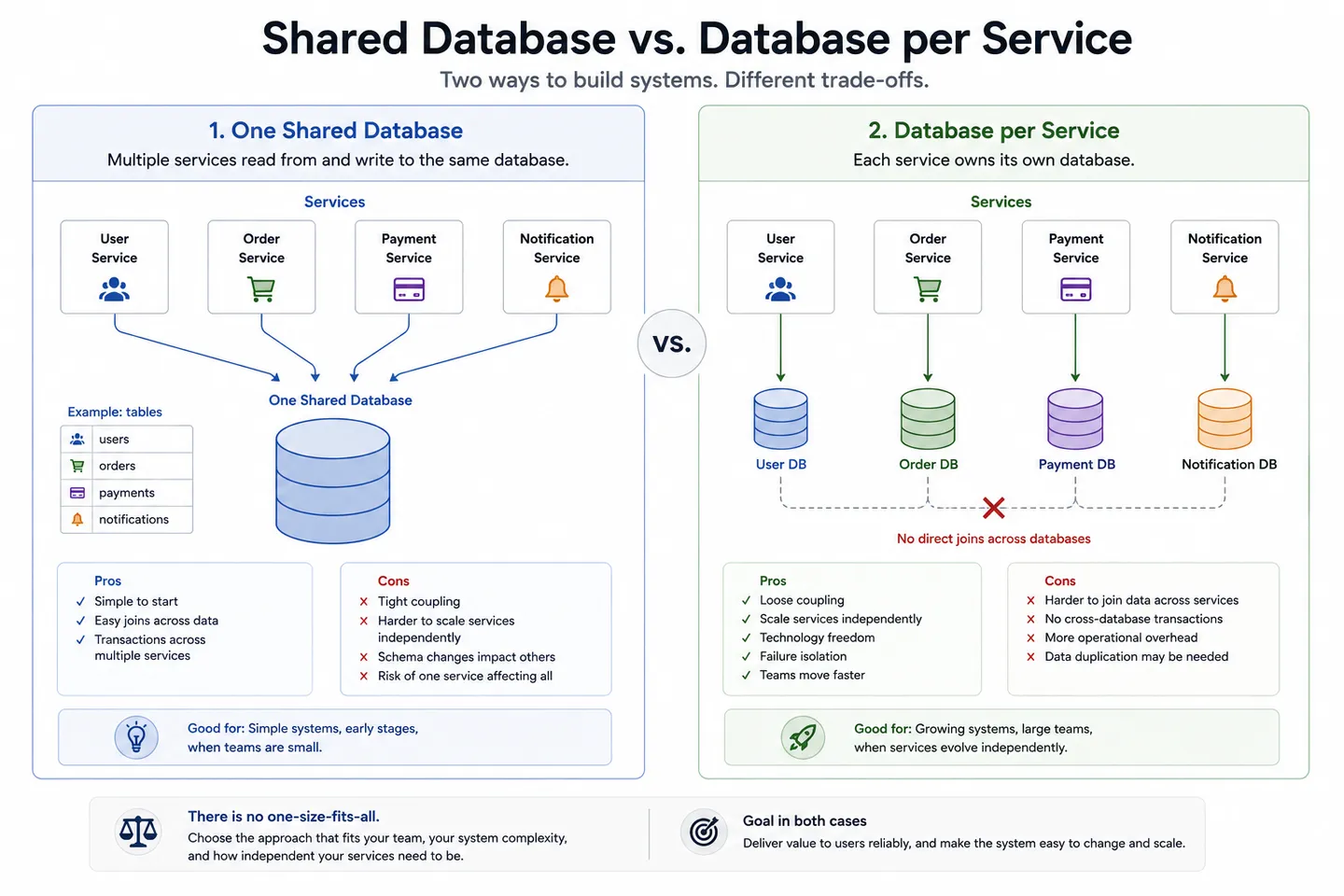
Who is allowed to talk to it is an architectural decision with real consequences. One shared database that every service reads and writes is simple and consistent, but it couples everything to one schema, and changing a column becomes a negotiation between teams. Giving each service its own is the other end of the same trade-off at the centre of monoliths versus microservices, and it buys independence at the cost of never being able to join across the boundary again.
What developers usually get wrong#
The first misconception is that the database is a passive bucket, so all the logic should live in the application. In practice the engine knows things your code cannot: which index exists, how many rows match, what other transactions are currently doing. Pulling ten thousand rows into memory to filter them in Javascript is slower and less correct than asking for the ones you want.
The second is treating an ORM as a replacement for understanding the database. An ORM maps rows to objects, which is genuinely useful, and it also makes it effortless to write a loop that issues one query per iteration without noticing. Knowing what SQL your code is producing is not an advanced skill, it is the baseline for using an ORM well.
The third is assuming the database is where everything belongs. It is the right home for facts you must not lose, and a poor home for things like large files or a stream of events that nobody will read twice. Sessions are the interesting middle case, because keeping them server-side means the database is consulted on every single request, which is one of the trade-offs behind how websites keep you logged in.
And the fourth, which is less a misconception than a warning: what you store is a liability as much as an asset. The reason websites cannot tell you your own password is that the sensible thing to keep in a users table is a hash and never the original, and the same instinct applies to everything else you are tempted to save because it might be useful one day.
Wrapping up#
A database is not a spreadsheet with a login. It is the piece of your system that has agreed to be careful, and the guarantees it makes are the ones you would eventually have to build yourself, badly, if it did not exist.
Every feature traces back to a failure in the file version. Transactions exist because a crash can land between two writes. Isolation exists because two requests can arrive at the same instant. Indexes exist because scanning everything to find one row stops working at exactly the moment you start succeeding. Constraints exist because your application will not be the only thing writing to this data.
That is also the useful way to keep learning about them. When something in a database seems arbitrarily complicated, it is almost always the scar tissue from a specific way that data goes wrong, and finding the failure it was built for makes the design obvious in a way no amount of documentation does.
Key takeaways#
- A database is more than storage. It is a set of guarantees about correctness while many things read and write at the same time.
- The database is the data, the DBMS is the software that owns it, and the word gets used for both in conversation.
- Plain files break in four predictable ways: concurrent writes silently overwrite each other, crashes leave half-finished state, finding one record means reading all of them, and relationships have nowhere to live.
- Transactions make several operations happen as one indivisible step, so there is no observable state where half of them applied.
- Constraints enforce the rules for every path into the data, including migrations, admin tools and manual fixes that never touch your application code.
- Underneath, a database is still files on a normal filesystem. What differs is the discipline: fixed-size pages instead of one blob, a write-ahead log appended before anything is changed, and sorted index structures so a lookup never scans everything.
- The types of database differ by what they assume about your questions. Relational enforces shape and joins, document trades that enforcement for flexibility, key-value trades everything for speed, and the specialists win on one access pattern each.
- The database is a server on a port, and moving it to its own machine turns every query into a network call that can be slow or fail.
Frequently asked questions#
What is the difference between a database and a DBMS?#
The database is the stored data itself. The DBMS, or database management system, is the running software that organises it, enforces the rules and answers queries, such as PostgreSQL, MySQL or MongoDB. This is why types of database management system and database types mean the same thing in practice: it is the software that differs, not the data. People say "database" for both, which is only a problem when it is unclear whether the data or the process is the thing that has gone wrong.
Is Excel a database?#
Not in any useful sense. A spreadsheet stores rows and can filter them, but it has no transactions, no enforced types or relationships, and no way to handle many people writing at once without someone's changes being lost. Those are the specific problems a database exists to solve.
Can I use a JSON file instead of a database?#
You can, and for a single-user script it is a reasonable choice. It stops working as soon as two requests can arrive at the same time, because both read the same version and the second write erases the first, and a crash mid-write can leave the file unreadable with no earlier copy to fall back on.
What does ACID mean?#
ACID describes four guarantees a transactional database makes: atomicity, so a transaction applies fully or not at all; consistency, so the data still obeys its rules afterwards; isolation, so concurrent transactions do not see each other's unfinished work; and durability, so a committed change survives a crash.
What are the main types of databases?#
Relational databases store rows in tables with a fixed schema, document databases store schema-free nested documents, key-value stores map one key to one value in memory, and wide-column stores spread table-like data across many machines. Alongside those sit specialists built for one access pattern: time series, full-text search, graphs and columnar analytics.
SQL or NoSQL, which should I use?#
For most applications, a relational database is the safer default, because you get transactions, constraints and a query planner without giving anything up. Reach for something else when you can name the specific property you need that relational engines handle poorly, such as an unpredictable document shape or a write volume beyond what one primary can take.
Does the database have to run on a separate machine?#
No. It is a process listening on a port, and running it alongside your application is completely normal for small projects. Separating it becomes worthwhile when you want to scale, back up or restart the two independently, and the cost is that every query becomes a network call.
Continue reading#
Three articles pick up the threads this one leaves hanging, one on the storage layer underneath, one on the machine it runs on, and one on who is allowed to talk to it.
- How a database stores data on disk. Pages, the write-ahead log, crash recovery and what an index physically is, which is where the guarantees in this article are actually implemented.
- What is a server, really?. The database server is one of four jobs behind a typical website, and this covers the other three and how they fit together.
- Monolith vs microservices explained. What happens to your data when the application splits into services, and why one shared database is the decision that usually decides the rest.