

There’s a moment in most developers’ careers when someone reviews your pull request and leaves a comment that feels almost insulting.
You’ve already validated the form. The email field checks for an @, the quantity field rejects negative numbers, and the submit button stays disabled until everything is filled in.
Then the reviewer writes:
This needs to happen on the server too.
First time I saw it, my reaction was that they hadn’t read the code properly. The validation was right there. Why would we write the same thing twice? It felt like the kind of ceremony that exists because a senior developer got burned by it once, and now everyone else has to pay the tax forever.
It took me longer than I’d like to admit to understand that these two checks aren’t duplicates at all. They happen in different places, for different reasons, and they protect you from very different problems.
One is there to help your users. The other is there because the browser belongs to the user, and the user can change whatever they want.
That small idea changes the way you look at a lot of web development.
Once you understand why a server can’t trust your browser, things like server-side validation, authentication, authorization, and even seemingly harmless form checks start to make a lot more sense.
What is the client-server trust boundary?#
Let's say you have created and deployed an online shop.
When someone opens their browser and presses Enter in their address bar, a lot of machinery wakes up. Their browser resolves the domain, opens a connection, and sends a request.
Your server sends back the HTML, CSS, and Javascript that make up your website. That code now runs in the visitor's browser, on their machine.
This is where the important distinction begins: the browser belongs to the visitor; the server belongs to you.
The visitor can inspect your Javascript, change it, open DevTools, disable things, or send requests directly to your server.
You control what happens on the server.
That creates the trust boundary:
      Their machine                     Your server
  ┌─────────────────────┐         ┌─────────────────────┐
  │ Browser             │         │ Server              │
  │ HTML, CSS, JS       │         │ App code, database  │
  │ DevTools, extensions│         │ Nobody else's hands │
  │                     │         │                     │
  │ They control this   │         │ You control this    │
  └─────────────────────┘         └─────────────────────┘
             │                               │
             └──────────  HTTP  ─────────────┘
                    the trust boundary
Anything on the left side is a claim. Anything on the right side is something your application can verify and enforce.
A lot of web security comes down to remembering this boundary, and the expensive lessons that happen when we forget it.
Why client-side validation can be bypassed in seconds#
Imagine now that you’re building a checkout feature for your online shop. The main scenario you have in mind is a customer finding a product and deciding to buy it.
For our example, let’s say the product costs €50.
Your checkout page sends the price in a hidden form field:
<input type="hidden" name="price" value="50">You also have some Javascript that checks the form before allowing the customer to submit it. You test everything, place a few orders, and everything works. Customers pay the correct price.
The problem is that once your site is in production, the browser is running on the customer's machine. The customer can open DevTools and change what your page sent to their browser.
For example, they could change:
<input type="hidden" name="price" value="50">to:
<input type="hidden" name="price" value="1">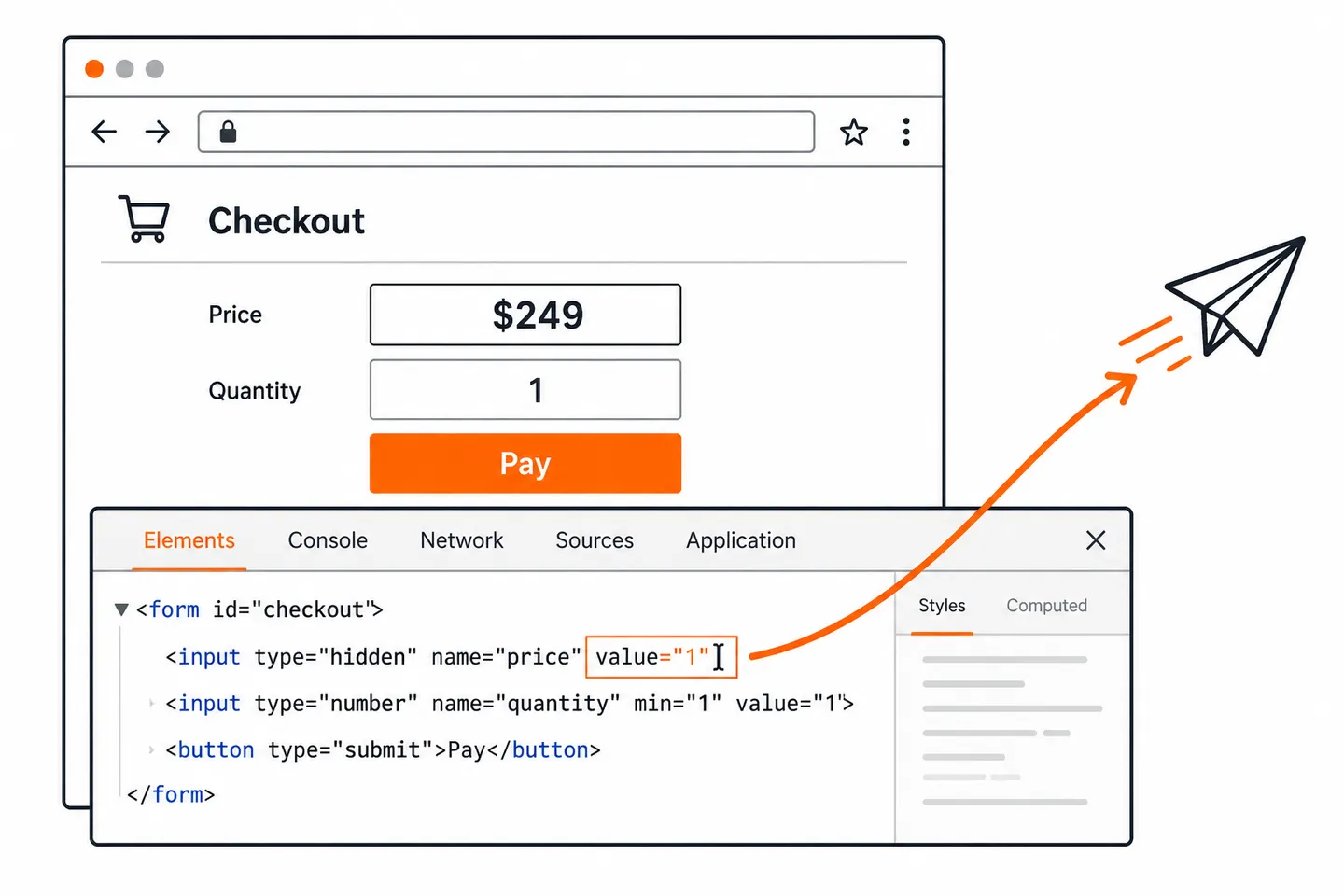
Now the browser can send 1 as the price.
They could also change or remove a min="1" restriction on the quantity field, remove the Javascript checks, or skip the checkout page completely and send the HTTP request themselves with curl.
This is the important part: the server cannot trust the client to follow the rules defined in the frontend.
And the client doesn't have to be a browser at all. Someone can simply send the request directly:
POST /checkout HTTP/1.1
Host: yourshop.example
Content-Type: application/json

{ "productId": 4417, "quantity": 1, "price": 1 }
From the server's point of view, this is just a normal HTTP request.
HTTP doesn't tell the server:
"This request came from your checkout page, and the user didn't change anything."
The server receives the request and has to decide whether the data is valid.
That's why important values should be checked on the server. Instead of trusting the price sent by the browser, the server should receive the product ID and look up the real price itself.
That’s the part that reframes everything.
Client-side validation isn't weak security. It isn't security at all. It's a user experience feature. It can tell someone their email is missing an @ before they have to wait for a round trip, and that’s genuinely valuable.
In the end, though, the server is the one that has the final say.
The browser can help, but it has no authority.
Which parts of an HTTP request can be spoofed#
Before we dive into which parts of a request can be spoofed, let's first understand what spoofing actually means.
In simple terms, spoofing means pretending to be something you are not.
In the context of web requests, it means a client sends information that makes the request look different from what it really is. The important detail is that the client gets to choose what goes into the request.
Once you understand the trust boundary, a lot of familiar things start looking different. A request is made up of many pieces of information, but the server shouldn't automatically treat all of them as facts.
A useful way to think about this is to group the things a client can send into a few broad categories.
1. Form fields and request data#
This is the easiest category to understand because we just saw it with the checkout example.
A browser might send:
{
  "productId": 4417,
  "quantity": 2,
  "price": 50
}
But the client can change any of those values before sending the request:
{
  "productId": 4417,
  "quantity": 2,
  "price": 1
}
The server therefore cannot trust the price simply because it came from a form your application created.
The same applies to things like:
- quantity
- account IDs
- roles
- permissions
- discount codes
- feature flags
- hidden form fields
If the client sends the value, the client can potentially change it.
2. Request headers#
Headers can also look more trustworthy than they really are.
Take User-Agent. A browser normally sends information about itself:
User-Agent: Mozilla/5.0 ... Chrome/131.0 ...Your server might use this for analytics or logging. That's fine. But if you use it as a security check, you're trusting the client to tell you the truth.
A request made with curl can send the same value:
curl https://yourshop.example/api/example \
-H "User-Agent: Mozilla/5.0 ... Chrome/131.0 ..."
Your server sees the same header.
The same idea applies to headers such as Referer. It can tell you where
the client says the request came from, but it isn't proof that the request
actually came from there. The same caution applies to the rest of the
HTTP request headers you'll meet every day,
because every one of them is written by the client.
3. Identity and authentication data#
This category is a little different. A client can send a cookie containing a session ID:
Cookie: sessionId=abc123The browser is still choosing to send that value. The important question is what the server does with it.
A secure session system doesn't blindly trust the cookie just because it came from the browser. Instead, the server uses the session ID to look up the session in its own store.
But there is still a small amount of trust involved. The server is essentially assuming that whoever presents a valid session ID is the person who should be using that session. It relies on the session ID being kept secret and not being stolen.
So the browser carries the identifier, but the server decides what that identifier means.
The same principle applies to signed tokens. A client can read a token and send it back, but if they modify its contents, the server can detect the change because the signature no longer matches.
So authentication data is still client-provided data. It becomes trustworthy enough to use because the server has a way to verify it, and because the system assumes the credential itself has not been stolen. That verification step is the whole reason user authentication works the way it does, whatever method sits behind it.
That distinction is important: the server doesn't trust the browser; it trusts a credential that it can verify.
4. Network information#
Then there is information that looks like it should describe the connection itself, such as the client's IP address.
This is where things become more complicated because the request may pass through several systems before reaching your application:
  Visitor
     ↓
  Browser
     ↓
  CDN / proxy
     ↓
 Load balancer
     ↓
 Your server
Your application may therefore learn the client's IP from a forwarded header rather than directly from the network connection.
That's why headers such as X-Forwarded-For need special handling. Your application needs to know which proxies it trusts before treating the
information they provide as the real client IP.
This is also why rate limiting based on IP can go wrong if the proxy configuration is incorrect.
The important distinction#
All of these examples start with the same basic fact:
The client can send data, but sending data doesn't make it true.
The server has to decide what can be trusted directly, what needs to be validated, and what needs some stronger form of verification. That's the real lesson behind spoofing. You don't need to memorize every header that can be spoofed.
You need to recognize the pattern:
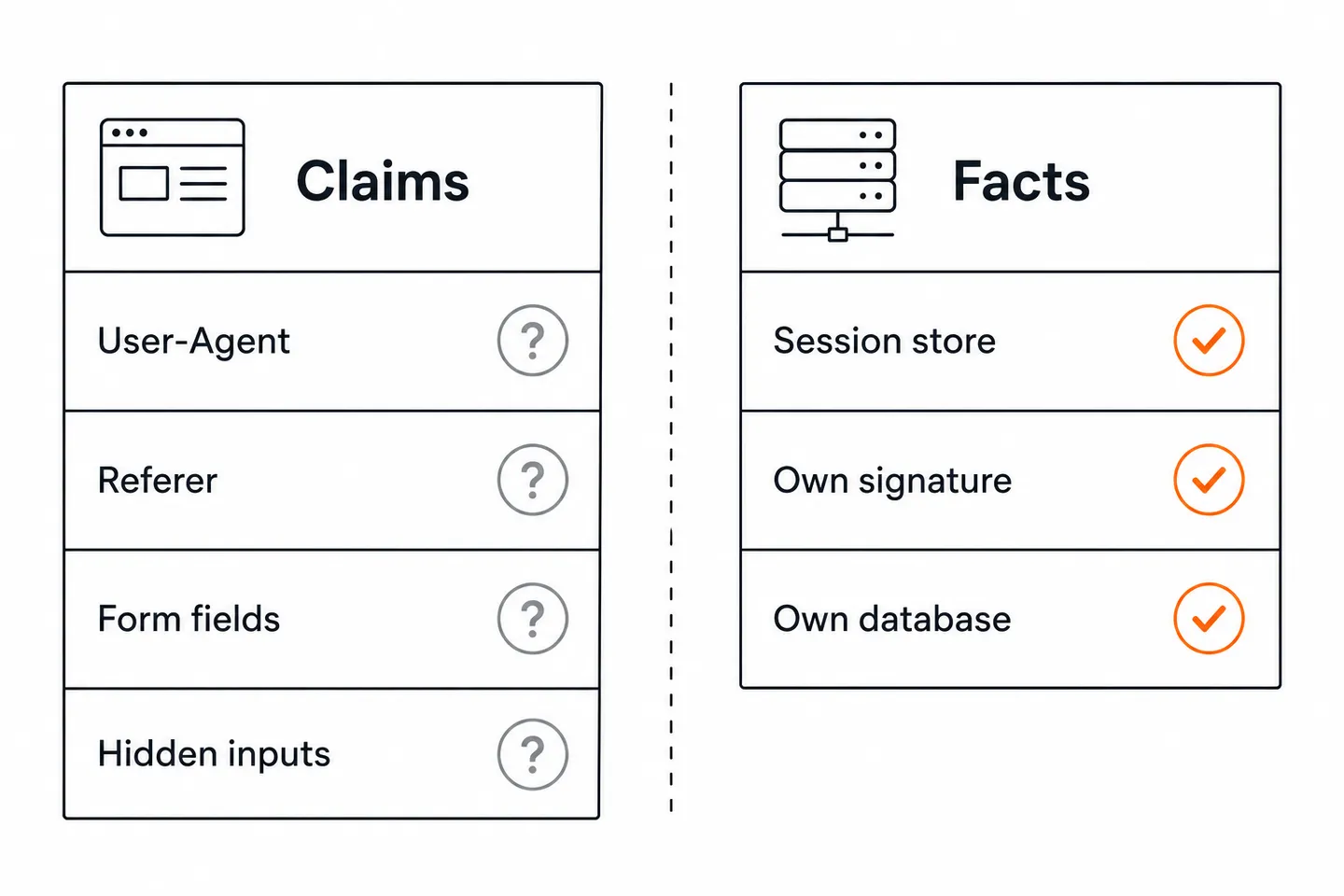
If the client controls the value, treat it as a claim until your server has a reason to trust it.
What a server can safely trust instead#
So if the client can change almost anything in a request, what can the server actually trust?
The answer isn't "nothing." The answer is that the server should trust things it can verify independently.
For example, instead of trusting the price sent by the browser, the server can take the product ID and look up the price in its own database.
Instead of trusting a role sent by the client:
{
  "userId": 123,
  "role": "admin"
}
the server can get the user's role from its own database or session.
Instead of trusting that a session ID is valid because the browser sent it, the server can look it up in its own session store.
Instead of trusting that a token hasn't been changed, the server can verify its signature.
And instead of trusting a password sent by the client by storing it and comparing it later, the server stores a password hash and verifies the password against that hash.
The pattern is the important part.
The server doesn't need to prove that the browser is trustworthy. It doesn't need to know whether the request came from Chrome, curl, Postman, or a script.
It needs to take the claims in the request and compare them against something it can verify independently.
That's the kind of trust that survives the boundary.
Why modern frameworks blur client-side and server-side validation#
The reason this gets confusing in modern codebases is that the line between the browser and the server has become harder to see.
Over the last twenty years, more and more application logic has moved into the browser.
The jQuery era made it easy to validate forms in the browser and give users immediate feedback.
Single-page applications moved even more of the application's logic into the browser, including routing and state.
React made it natural to put logic inside components. A permission check can sit next to the button it controls and look completely legitimate.
Then Node.js put the same language on both sides of the boundary. Now a validation function can look almost identical whether it runs in the browser or on the server.
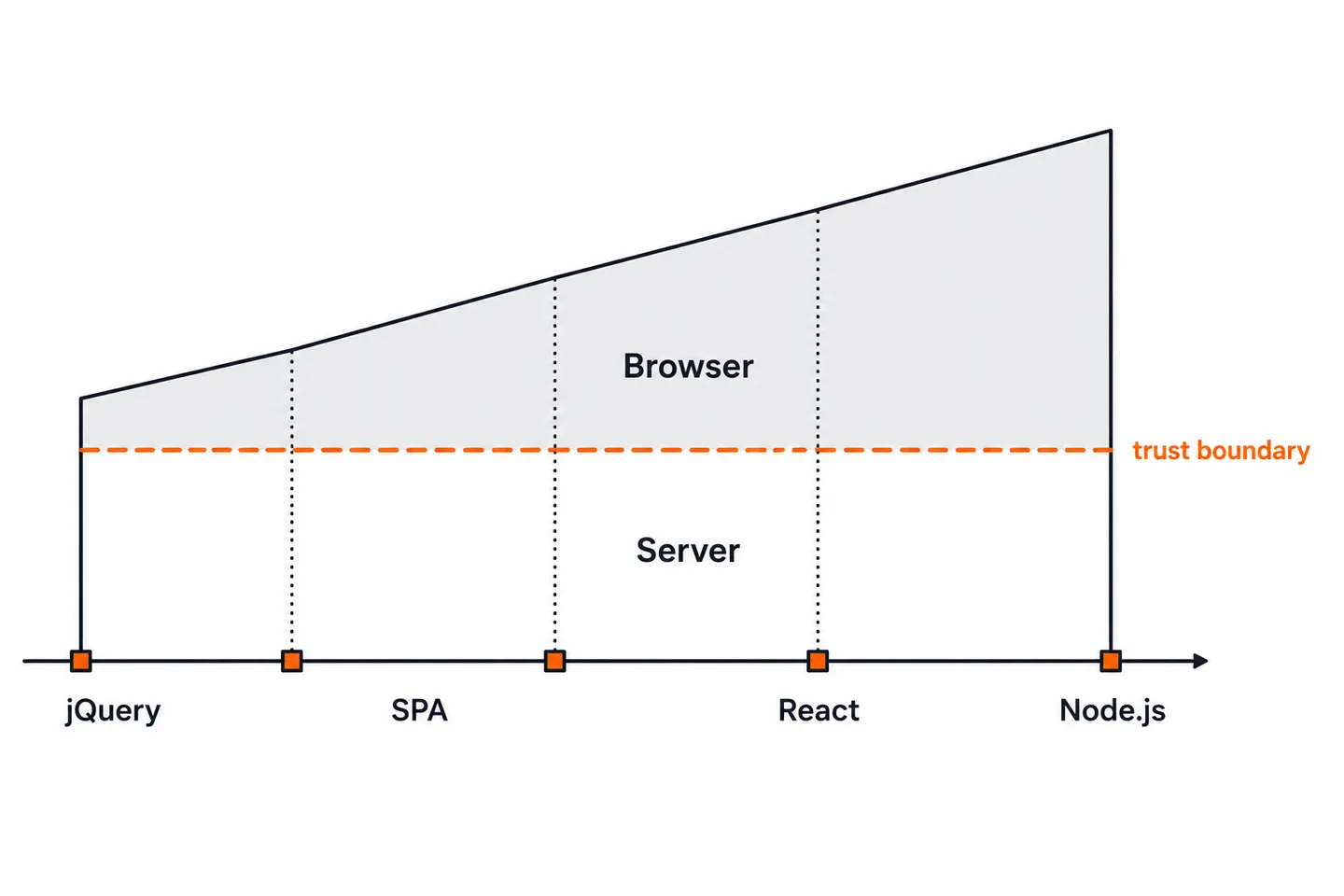
But none of this changed the trust boundary.
A check in a React component can improve the user experience, but it cannot protect an API. A route guard can hide the admin screen, but the admin API still has to check whether the user is actually allowed to perform the action.
The code moved.
The boundary didn't.
And this doesn't only apply to browsers.
If your server splits into multiple services talking over a network, you've created new trust boundaries where there used to be ordinary function calls.
The same question applies at every boundary:
Does this system actually control the thing it's about to believe?
Client-side vs server-side validation: where each check belongs#
None of this means you should remove your client-side validation. Keep it. It makes forms easier to use, gives users immediate feedback, and avoids unnecessary requests. If someone enters an invalid email address, for example, the browser can point that out immediately instead of waiting for the server to respond. MDN makes the same point in its guide to form validation, which is worth reading if you want the practical details.
The important checks, however, need to exist on the server too. Think about the things your application actually cares about:
- A checkout page can check that the quantity is at least 1, but the server should calculate the final price from the product in the database.
- A frontend can hide an "Admin" button from regular users, but the server must check the user's permissions when the admin API is called. Getting this wrong is common enough that OWASP, the Open Worldwide Application Security Project, ranks broken access control as the number one web application risk.
- A form can require a username and password, but the server still needs to validate both when the request arrives.
- A file upload can limit the file size in the browser, but the server must enforce the limit because someone can upload the file without using your form at all.
The browser's checks make the application nicer to use. The server's checks are what actually enforce the rules.
This isn't about distrusting everything. It's about knowing where a decision is being made and whether the thing making that decision can be controlled by the person you're trying to protect against.
That same idea appears throughout web security: CSRF, CORS, API keys, rate limiting, authentication, authorization, and many other topics are all different ways of dealing with trust across boundaries.
Once you understand that boundary, you don't need to memorize a separate rule for every situation. You can ask the same question each time:
Who controls this value, and how can I verify it?
Key takeaways#
- The trust boundary sits between the browser the user controls and the server that controls the application logic.
- Client-side validation improves the user experience, but it is not a security control. Anything enforced only by the browser can be changed or bypassed.
- Request data is not automatically trustworthy just because it arrived over HTTP. This includes form fields, JSON data, headers, and cookies.
- When something matters, the server should verify it independently using data or mechanisms it controls, such as its database, session store, or cryptographic signatures.
- Modern frameworks have moved more application logic into the browser, but the trust boundary itself has not moved.
Frequently asked questions#
Is client-side validation enough on its own?#
No. Client-side validation gives users immediate feedback, makes forms more responsive, and can prevent unnecessary requests. But the user controls the browser, so they can change or bypass those checks. Important validation must also happen on the server.
Can a server detect if a request came from a real browser?#
Not reliably. Headers such as User-Agent can be changed, and browser fingerprinting is still based on information provided by the client. These techniques can help with bot detection, but they should not be treated as proof that a request came from a trustworthy browser.
Does HTTPS mean I can trust the request data?#
No. HTTPS protects the connection between the client and the server from being read or modified by someone in the middle. It does not tell you that the person or program making the request is trustworthy. A modified or malicious request can still arrive over a perfectly secure HTTPS connection.
Should validation happen on the client or the server?#
Usually, both. Put checks in the browser when they improve the user experience, such as showing that an email address is missing or a required field is empty. Then enforce the important rules again on the server.
For example, the browser can show an error when a username is too short, but the server should enforce the actual minimum length when the request arrives. The browser can also show a countdown before allowing a user to request another verification email, but the server must enforce the rate limit itself.
The two checks have different jobs: the client helps the user; the server enforces the rules.