

One of the most common things you do every day is log in to websites. You enter your username and password, click Log in, and you're in.
Then you open a few more pages, refresh the browser, or come back an hour later. Somehow, the website still knows who you are, even though you only entered your password once.
That might feel completely normal, but it's actually a surprisingly interesting problem to solve.
In the previous article of this series, we looked at the different ways websites can authenticate users. But authentication is only the first step.
How does the website remember that it's still You on the next request?
That's what this article is about.
Why your password isn't sent on every request#
If you've read the previous article in this series, you already know that authentication is the process of proving your identity. But that naturally raises another question.
Why isn't your password sent with every request? Why is sending it only once considered the best practice?
At first glance, it doesn't sound like a bad idea.
Every time you open a page, refresh it, or click a link, your browser could simply include your username and password, and the server could verify them before sending a response.
GET /profile

Authentication:
  username: myUsername
  password: MySecretPassword123
And it could do exactly the same thing for every request that follows.
GET /orders

Authentication:
  username: myUsername
  password: MySecretPassword123

GET /settings

Authentication:
  username: myUsername
  password: MySecretPassword123
It sounds simple, but it's actually a terrible idea. Why? Did you ever pause and think about it?
Even though HTTPS encrypts the connection between your browser and the server, sending your password over and over again gives it many more opportunities to leak. It could accidentally end up in application bugs, server logs, browser extensions, debugging tools, or anywhere else sensitive information is handled.
You might be wondering, "But doesn't the website hash my password anyway?"
It does, but only after the password reaches the server. To verify your identity, the browser still has to send the original password every time. The more often that happens, the more opportunities there are for it to be exposed.
Your password really has only one job: to prove who you are. Once the website has verified your identity, there's no reason to keep sending that same secret again and again.
It's a bit like showing your ID when entering a private event. You show it once to prove who you are. After that, nobody asks to see it every time you walk from one room to another. They simply need another way to recognise that it's still you.
So if the website stops asking for your password, what does it use instead?
So what replaces your password?#
Once you've successfully authenticated, the website somehow has to remember who you are.
But why doesn't it already know?
After all, you authenticated just a few seconds ago.
The answer is that HTTP doesn't remember previous requests. Every request is treated independently, so when your browser asks for the next page, the website has no built-in way of knowing that you authenticated a few seconds ago.
Instead of asking for your password again, the server creates a new credential and sends it to your browser. Your browser stores it and automatically includes it with future requests, allowing the server to recognise you without asking for your password again.
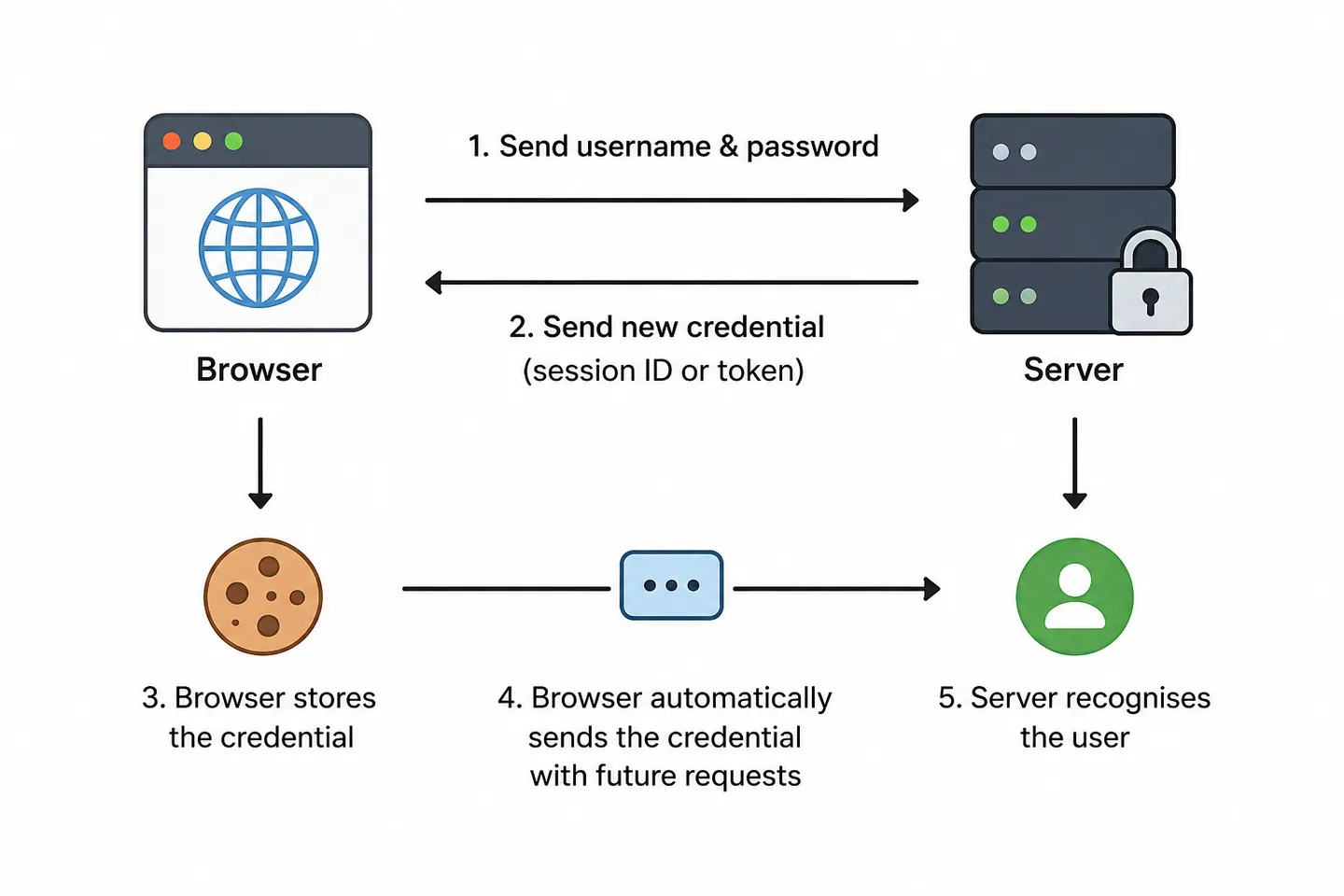
Depending on how the application is built, that credential is usually one of these:
- A session ID, where the server remembers who you are.
- A token, where the credential itself carries the information needed to identify you.
In many applications, that credential is stored and sent inside a cookie, although cookies can be used for many other purposes besides authentication.
At this point you've probably noticed three terms coming up repeatedly:
They're closely related, but they aren't interchangeable. Let's see what each one is and how they work together.
Sessions: the server remembers#
When I first heard the term session, I found it a little confusing.
The word made me think of a study session, something that simply has a beginning and an end. While that's not completely wrong, in web development a session usually refers to something much more specific.
A session is a piece of information the server creates after you've successfully authenticated. It allows the server to remember who you are without asking for your password on every request.
Because this information lives on the server, you'll often hear it called a server session. In practice, though, developers usually shorten it to simply session, and both terms normally mean the same thing.
You can think of it as a small record that stores information about your authenticated state.
Session ID: abc123xyz

User: John
Authenticated: Yes
Created: 10:32
Expires: 18:32
Notice that this record contains much more than just your identity. The server can store almost anything it needs for the current session, such as when you authenticated, when the session expires, your permissions, or other temporary information.
Depending on the application, these sessions might be stored in memory, Redis, or a database. Wherever they're stored, the idea is exactly the same: the server keeps the information and uses the session ID to find it again.
The important thing to understand is that this session never leaves the server.
Session never leaves the server
Instead, the server creates a unique session ID that identifies it.
Session ID → abc123xyzThink of the session ID as the session's unique identifier. The browser doesn't need the whole session; it only needs a way to tell the server which session belongs to it. Keeping the real data on the server side is deliberate rather than incidental, because a server can never trust your browser with anything it would be willing to believe later.
Whenever your browser makes another request, it sends the session ID back to the server. The server looks up the matching session and, if it finds one, immediately knows who you are without asking for your password again.
At this point you might be wondering:
"If the session ID is enough to identify me, what happens if someone steals it?"
That's a great question, and the short answer is that yes, anyone who obtains a valid session ID may be able to impersonate you until that session expires or is invalidated. That's why protecting session IDs is just as important as protecting passwords.
Fortunately, modern browsers and websites include several layers of protection to make stealing session IDs much harder. We'll come back to those shortly.
But before we can understand how they're protected, we first need to answer another question:
How does the browser remember and automatically send the session ID with every request?
Cookies: how the browser remembers#
We've now seen that the server creates a session and sends the browser a session ID.
The next logical question would be: Where does the browser actually keep that session ID?
Browsers can store information in several places, for example:
- Cookies, small pieces of data that are automatically sent with requests to the same website.
- Local storage, data that's stored in the browser and remains there until it's removed.
- Session storage, similar to local storage, but it's cleared when you close the browser tab.
When websites use sessions, the session ID is most commonly stored in a cookie.
When I first learned about cookies, I thought they existed only for authentication.
Ironically, most of us had already heard about cookies for years because of those cookie banners on almost every website, without actually knowing what cookies were. A cookie is simply a small piece of data that a website asks the browser to store. Once stored, the browser automatically includes that cookie in future requests to the same website, using the Cookie request header.
For example, after you authenticate, the server might respond with something like this:
Set-Cookie:
sessionId=abc123xyz
The browser stores that cookie automatically, assuming nothing about the cookie breaks its rules.
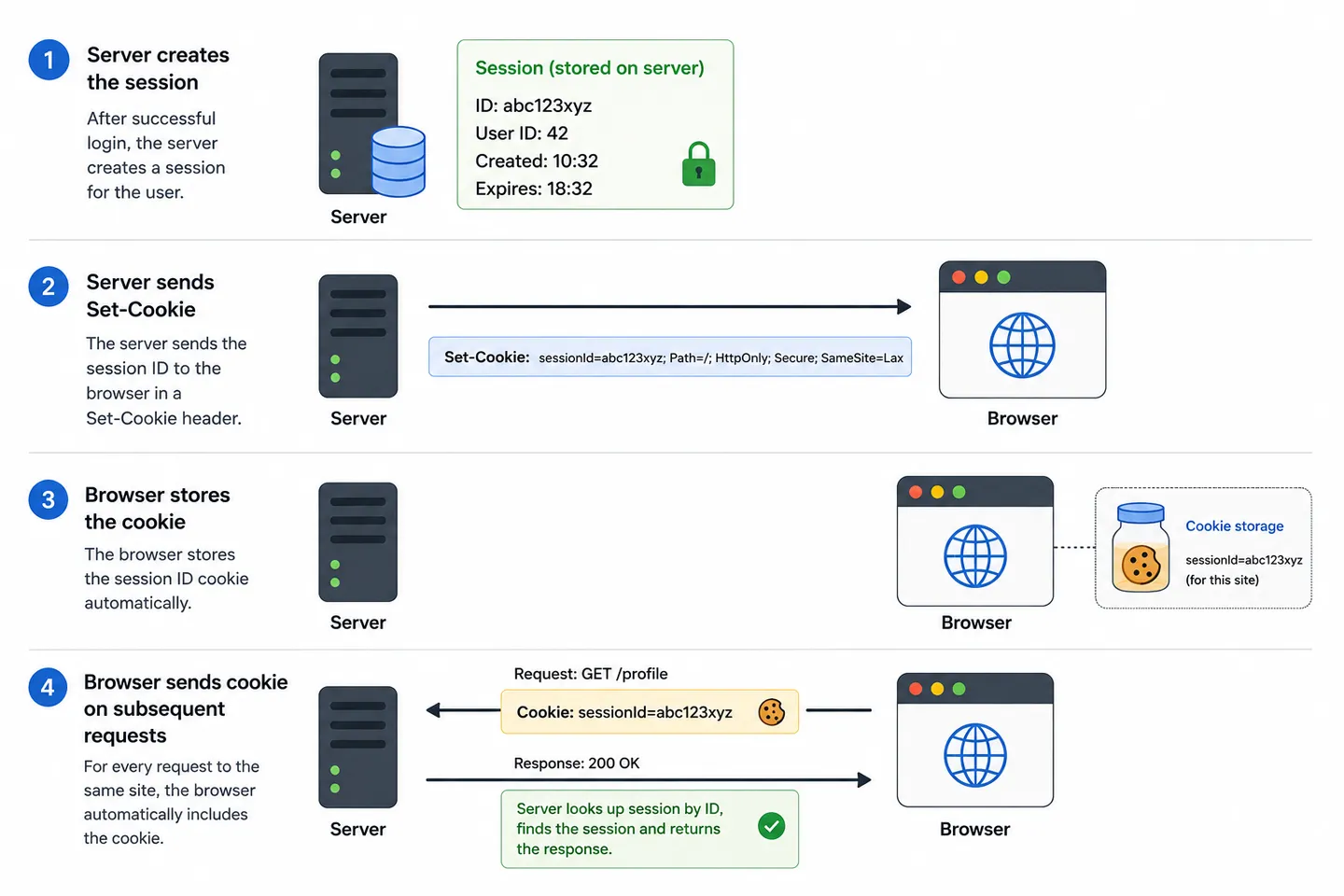
From that point on, every request to the same website includes it automatically too.
GET /profile

Cookie:
sessionId=abc123xyz
The server reads the session ID from the cookie, looks up the matching session, and immediately knows who you are.
Notice that, as we discussed earlier, the cookie doesn't contain the session itself. It only contains the session ID. The actual session always remains on the server.
We've now seen the classic solution.
The server remembers who you are by storing a session, while the browser remembers which session belongs to you by storing its session ID in a cookie.
It's a simple approach, but it also means the server has to keep a session for every authenticated user.
What if it didn't have to?
That's where tokens come in.
Tokens: the browser carries the information#
Sessions aren't the only way to keep users logged in.
Instead of asking the server to remember every authenticated user, some applications take a different approach. They give the browser a token that represents the authenticated user.
A token is simply a piece of data that the browser sends with future requests. Unlike a session ID, which is just an identifier, a token usually carries information about the authenticated user.
Conceptually, you can think of a token as containing information like this:
User ID: 123
Role: Admin
Expires: 18:32
Of course, that's not how it's actually sent over the network. Real tokens are encoded into a compact string that the browser sends with each request. One of the most common formats is the JSON Web Token (JWT), which looks something like this:
eyJhbGciOiJIUzI1NiIsInR5cCI6IkpXVCJ9...Don't worry about understanding that string yet. In the next article, we'll break it apart, piece by piece, and see exactly what's inside it.
For now, the important thing is understanding how tokens differ from sessions.
The following diagram shows the main difference between the two approaches.
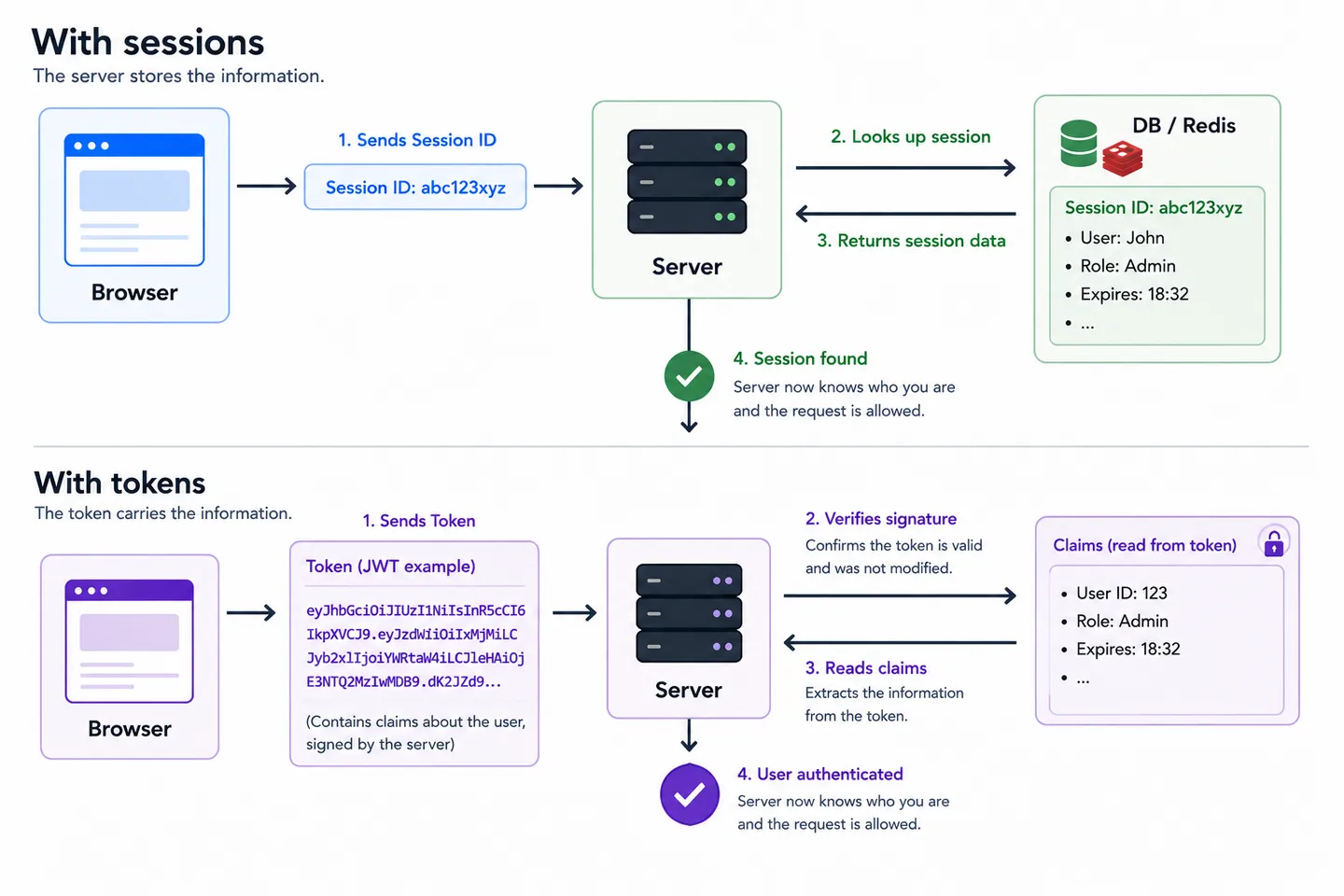
The main difference is this.
With sessions, the browser sends a session ID and the server uses it to find the matching session.
With tokens, the browser sends the token itself. Before trusting it, the server verifies that the token is genuine and hasn't been modified. If the verification succeeds, the server reads the information inside the token and identifies the user.
One of the biggest advantages of tokens is that the server doesn't have to keep a session for every authenticated user. This makes them especially popular for APIs, mobile applications, and distributed systems where many different servers may handle the same user's requests.
Just like a session ID, a token can also be stored in a cookie. It can also be stored somewhere else, such as local storage, depending on how the application is designed.
Sessions vs tokens: when to use each?#
Both approaches solve exactly the same problem: remembering who the authenticated user is between requests without asking for their password again.
The biggest difference is where the authentication information lives.
| Question | Sessions | Tokens |
|---|---|---|
| Where is the information stored? | On the server | Inside the token |
| What does the browser send? | A session ID | A token |
| What does the server do? | Looks up the session (memory, Redis, database) | Verifies the token and reads the information it contains |
| Does the server keep user state? | Yes | No |
| Common use cases | Traditional web applications | APIs, SPAs, mobile apps, distributed systems |
Neither approach is universally better. The right choice depends on the type of application you're building.
Sessions are often the simplest and most common choice for websites where the server generates the pages. Since the server is already handling every request, keeping a session for each authenticated user is usually straightforward.
Tokens are especially popular for APIs, mobile applications, and distributed systems. Because the authentication information travels with the token, any server that receives the request can verify it without having to look up a shared session. This makes it much easier to scale applications across multiple servers.
One final thing that's worth remembering is that these three terms describe completely different concepts.
Although we've used them in the context of authentication throughout this article, they're much broader than that and can be used in many different situations. s
- A session is a way for the server to store information between requests.
- A cookie is a browser feature for storing information and automatically sending it with future requests.
- A token is a piece of data that represents or carries information.
In authentication, these concepts simply become tools that help websites recognise who you are and keep you logged in.
If you remember those three definitions, you'll avoid one of the most common sources of confusion when learning how authentication works.
Explore the series#
We've now seen how websites remember who you are after you've authenticated.
In the next article, we'll take a closer look at JSON Web Tokens (JWTs). We'll open up a real token, see what's actually inside it, learn how it's signed, and understand why servers can trust it without storing a session.
- How user authentication works: the main methods explained
- Cookies vs Sessions vs Tokens: How websites keep you logged in (You're reading this)
- JWT authentication explained: What's actually inside a token? (Coming soon)