

The word session is used for at least three different things in web development, and they have almost nothing in common.
One of them is data sitting on a server. Another one is a rule about when a cookie is deleted. The third one is a small box of text that belongs to a single browser tab and that the server never sees.
They share a word, and that's it. They live in different places, different code can read them, and completely different events end them. Once you separate the three, a whole category of confusing bugs stops being confusing.
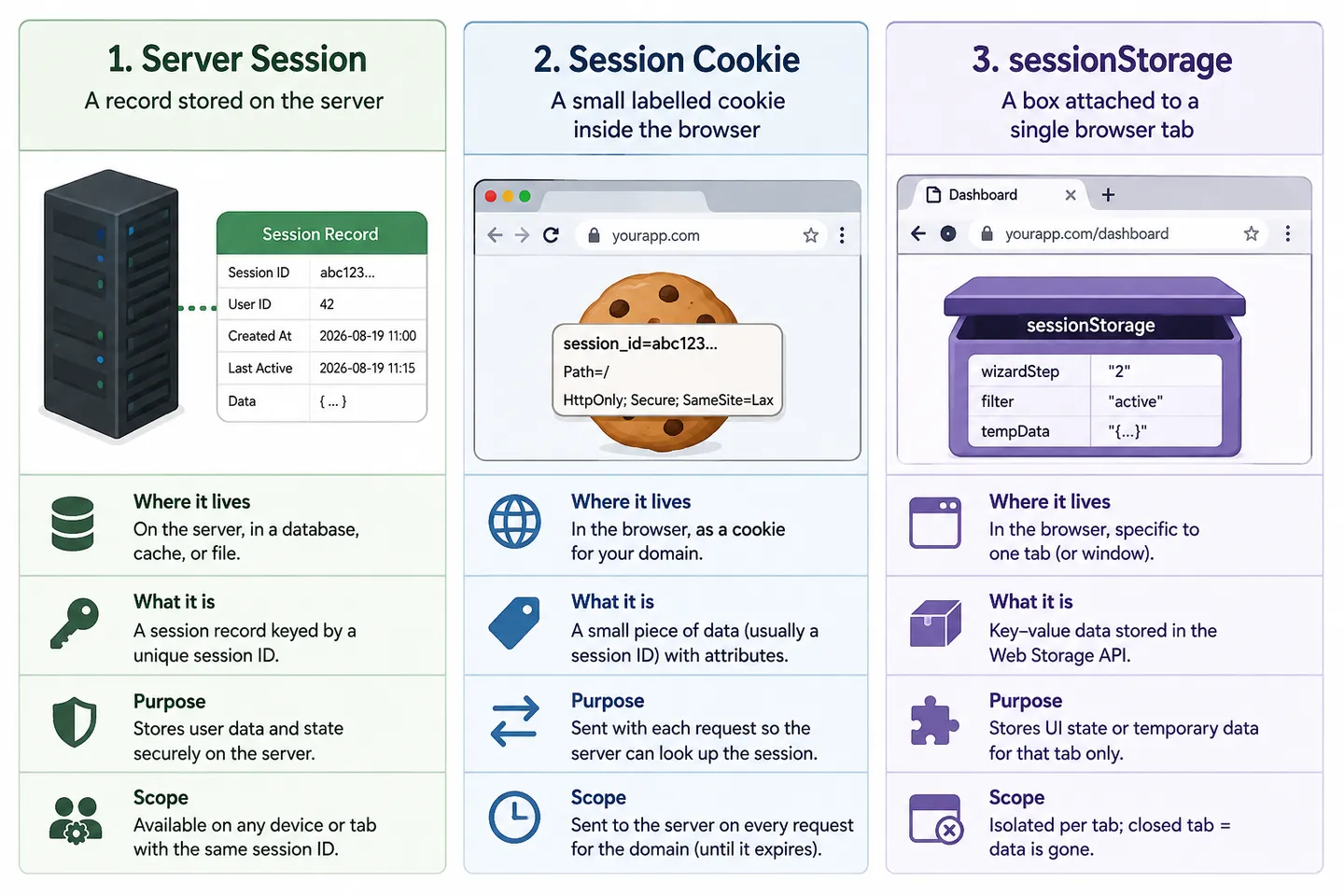
The server session: data that never leaves the server#
A server session is information the server stores about you between requests. After you log in, the server writes down who you are, when you authenticated, maybe your permissions, and keeps that record in memory, in Redis, or in a database.
Your browser never receives that record. It only receives a session ID, a random string that the server uses to find the record again on the next request. I go through the whole flow in cookies vs sessions vs tokens, so I won't repeat it here.
The important part for this article is where it lives. The session is on the server, which means nothing your browser does can delete it. You can close every tab, quit the browser, and reinstall it, and that record is still sitting there until the server decides otherwise.
The session cookie: a rule about when a cookie dies#
This is the one that trips people up the most, because the name sounds like "the cookie that holds the session".
A session cookie is any cookie that was set without an Expires date and without a Max-Age. That's the entire definition. It's not a special type of cookie, and it says nothing about what's inside it. It only tells the browser one thing, which is "keep this until the browsing session ends, then throw it away".
Set-Cookie: sessionId=abc123xyzThat's a session cookie, because there is no expiry on it.
Set-Cookie: sessionId=abc123xyz; Max-Age=1209600That's a persistent cookie holding exactly the same value. It survives closing the browser, because now the browser has been told how long to keep it.
So a cookie holding a session ID can be either one. A cookie holding your language preference can also be either one. "Session" here describes the lifetime, not the content. Both kinds are sent to the server automatically with every matching request, using the Cookie request header.
sessionStorage: one box per tab#
sessionStorage is a browser API for storing strings, and it is the only one of the three that Javascript on the page is meant to read and write directly.
sessionStorage.setItem("step", "3");
sessionStorage.getItem("step"); // "3"
Two things make it different from everything else. The first one is that it's never sent to the server. No header carries it, and the server has no way to ask for it. If you put something in sessionStorage, only your own Javascript will ever see it.
The second one is that it's scoped to a single tab, not to the whole browser. localStorage is shared by every tab open on the same site, so writing a value in one tab makes it visible in the others. sessionStorage is not. Open the same site in a second tab and that tab gets its own empty box, and the two tabs cannot see each other's values.
That per-tab behaviour is what makes it useful for things like the current step of a multi step form, or a scroll position you want to restore, where two tabs genuinely should not share state.
What ends a server session, a session cookie and sessionStorage?#
Here is where the three finally separate in a way you can test yourself. Each action below is answered for all three, because almost no action ends all of them.
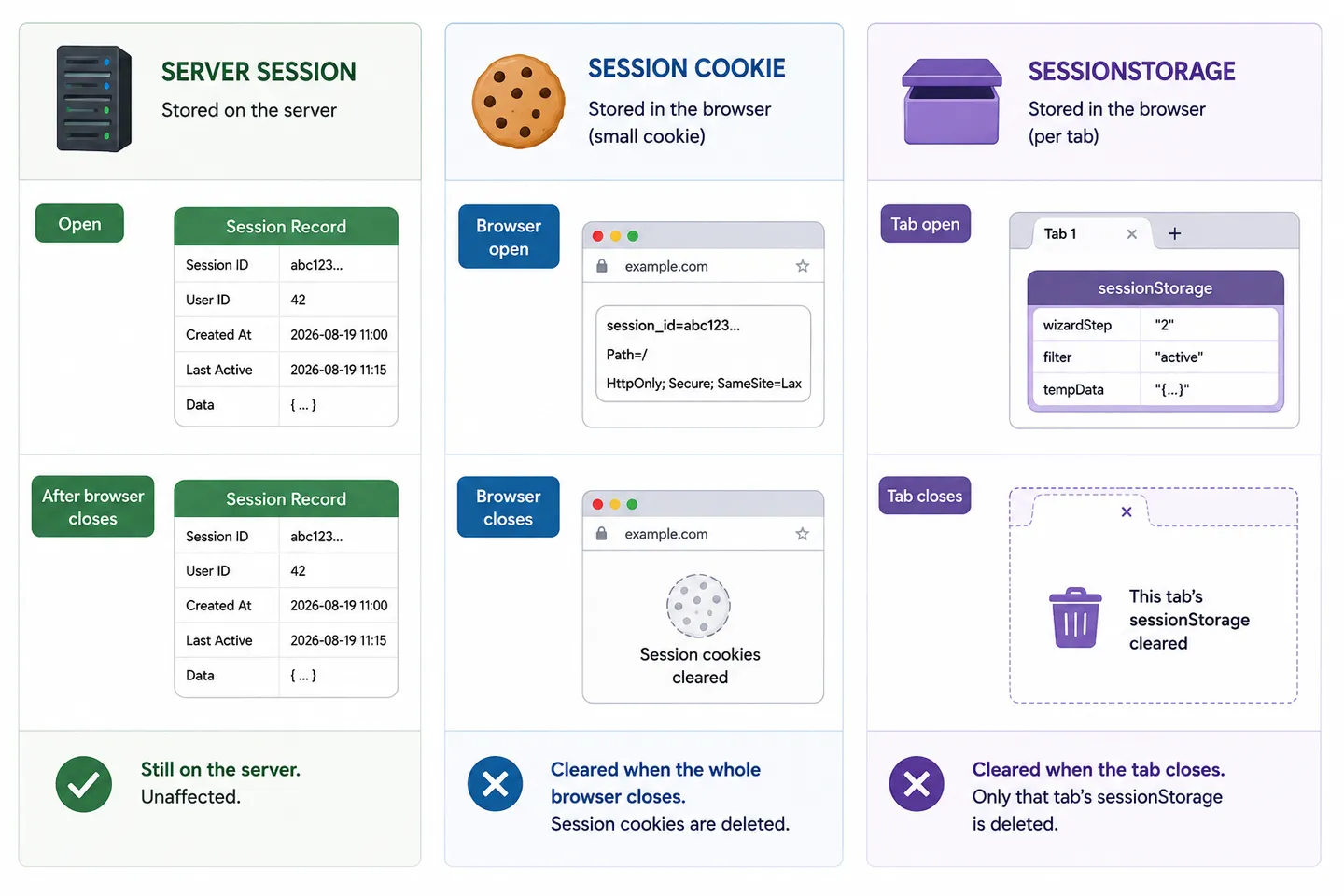
You refresh the page. Nothing ends. sessionStorage survives a reload, the cookies are still there, and the server session is untouched. This surprises people who expect a refresh to clear things, and it is the reason sessionStorage works for multi step forms.
You close the tab. The sessionStorage for that tab is gone. Cookies are not affected at all, because cookies belong to the browser and not to a tab. The server session is untouched, so opening the site again in a new tab leaves you logged in.
You open the same site in a second tab. The new tab gets a fresh, empty sessionStorage. Cookies and the server session are shared normally, which is why you are already logged in there.
You duplicate a tab, or open a link in a new tab from the page. The new tab starts with a copy of the original tab's sessionStorage. It's a copy and not a link, so from that moment the two tabs drift apart independently. This one catches almost everybody at least once.
You close the whole browser. If the site created a session cookie (a cookie without Expires or Max-Age), the browser normally deletes it when the browser session ends. On your next visit, there is no session ID to send, so the site treats you as logged out. But if the developer set an Expires or Max-Age attribute, the cookie is persistent and can survive the browser closing. Either way, the important point is that closing the browser does not delete the server session itself. The server-side record remains until it expires, is invalidated, or is otherwise removed.
You close the browser, but "continue where you left off" is on. Now closing the browser ends much less than you expected. Browsers that restore your previous tabs also restore session cookies and sessionStorage along with them, so you come back still logged in and with your tab state intact. The same thing happens after a crash recovery. If you have ever been unable to reproduce a "logged out on restart" bug, this setting is usually why.
You log out properly. This is the only one that ends the server session, because it's the only one the server hears about. The server deletes its own record, and normally also tells the browser to clear the cookie. Everything else on this list is something the browser did quietly on its own.
You do nothing for long enough. The server session expires on its own schedule and stops being valid, even though your cookie is still sitting in the browser looking perfectly fine.
The server restarts. If sessions are stored in the server's memory, they all disappear and everyone is logged out at once. If they're in Redis or a database, they survive. This is a big reason production apps rarely keep sessions in memory.
Side by side#
| Server session | Session cookie | sessionStorage | |
|---|---|---|---|
| Lives where? | On the server | In the browser, per site | In the browser, per tab |
| Who can read it? | Server code only | Server, and Javascript unless HttpOnly |
Javascript on the page only |
| Sent to the server? | It's already there | Yes, on every matching request | Never |
| Shared between tabs? | Yes | Yes | No |
| Ended by closing the tab | No | No | Yes |
| Ended by closing the browser | No | Yes, unless tabs are restored | Yes, unless tabs are restored |
| Typical use | Who you are, permissions | Carrying the session ID | Temporary per tab UI state |
The row worth memorising is the second to last one. Closing a tab ends exactly one of the three, and closing the browser ends the browser's copies but never the server's record.
Which one should you reach for?#
If the server needs to know something, it belongs in a server session, with a session cookie carrying the ID. Mark that cookie HttpOnly, Secure and SameSite, because a server can never trust your browser with data it intends to believe later.
If only the page needs it, and only in this tab, and it would be fine to lose it, use sessionStorage. A wizard step, a draft filter, a scroll position.
What you should not do is put a session ID or a token in sessionStorage and treat it as secure. It is not protected from cross site scripting in any way, since any script running on your page can read it. Being cleared when the tab closes feels like a security feature, but it's a lifetime feature, and it does nothing against the attack that actually matters.
Frequently asked questions#
Is a session cookie the same as a session ID?
No. The session ID is the value, and the session cookie is the envelope with no expiry date on it. You can send a session ID in a persistent cookie, and you can send something completely unrelated in a session cookie.
Does closing the browser log me out?
It usually looks that way, but the server session is still alive. Your browser simply dropped the session cookie, so it stopped identifying you. If tab restore is enabled, even that doesn't happen and you come back logged in.
Why is my sessionStorage empty in a new tab, but full in a duplicated one?
Because duplicating a tab copies the box, while opening a new tab creates an empty one. It's the intended behaviour, and it's the most common source of confusion with sessionStorage.
Can the server read sessionStorage?
Never, unless your own Javascript reads it and sends the value in a request. There is no header and no mechanism that exposes it automatically.